Organize Lease Documents Across a Multi-Market Portfolio: A Step-by-Step Guide
A practical five-step framework to organize lease documents across multi-market CRE portfolios using flat libraries, controlled metadata, taxonomy governance, and enforced naming conventions.
Published July 27, 2026 · By ARC-Files · 18 min read
Published: July 27, 2026 | By ARC-Files
Every operations team at a growing real estate firm hits the same wall. Someone needs a lease. Nobody knows where it is. When you try to organize lease documents across a multi-market portfolio, you quickly find that common approaches — deeper folders, stricter filing rules, more staff training — do not solve the problem. They just delay it.
This is not a search problem. It is a design problem.
This guide covers five decisions that determine whether your lease document library holds at scale. Each step builds on the last. By the end, you will have a clear framework — whether your portfolio has 20 properties or 200.
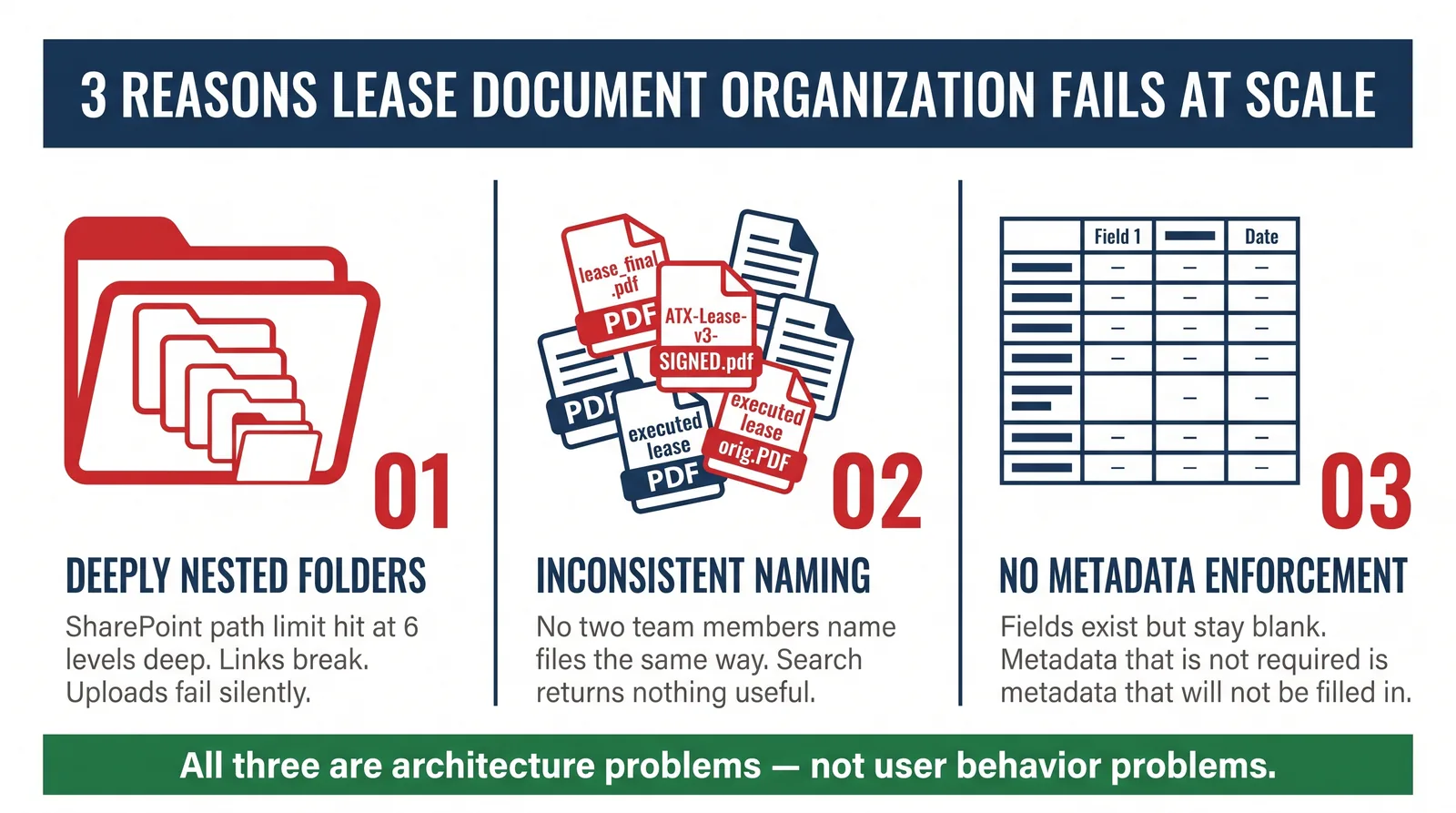
Table of Contents
- Key Takeaways
- Why Organizing Lease Documents in a Multi-Market Portfolio Breaks Down
- Step 1: Stop Using Deep Folders as Your Organization Strategy
- Step 2: Build a Property Taxonomy That Matches How Teams Think
- Step 3: Define Your Full Document Type List
- Step 4: Enforce Naming Conventions at Setup, Not After
- Step 5: Use Metadata Instead of Folders for Large-Scale Search
- Folder-Based vs. Metadata-Based: A Direct Comparison
- Sample Term Set Structure
- How CRE Lease Management Software Makes This Work
- Frequently Asked Questions
- The Bottom Line
Key Takeaways
- The three most common failures when you try to organize lease documents in a multi-market portfolio are: deeply nested folders, inconsistent file naming, and missing metadata. All three are design problems, not people problems.
- A flat document library with controlled metadata works better than nested folders for any CRE portfolio above 30 properties.
- The right taxonomy order is Market Group > Market > Property > Document Type. The direction matters — it determines which searches work and which do not.
- Naming conventions only work when the system enforces them at upload. Posting a policy document on the intranet does not work.
- ARC-Files applies all five of these systems inside your existing Microsoft 365 setup — no data migration needed.
Why Organizing Lease Documents in a Multi-Market Portfolio Breaks Down
Most CRE operations teams do not have one document problem. They have three separate problems that show up at the same time. Together, they look like one issue.
Problem 1: Deeply Nested Folders
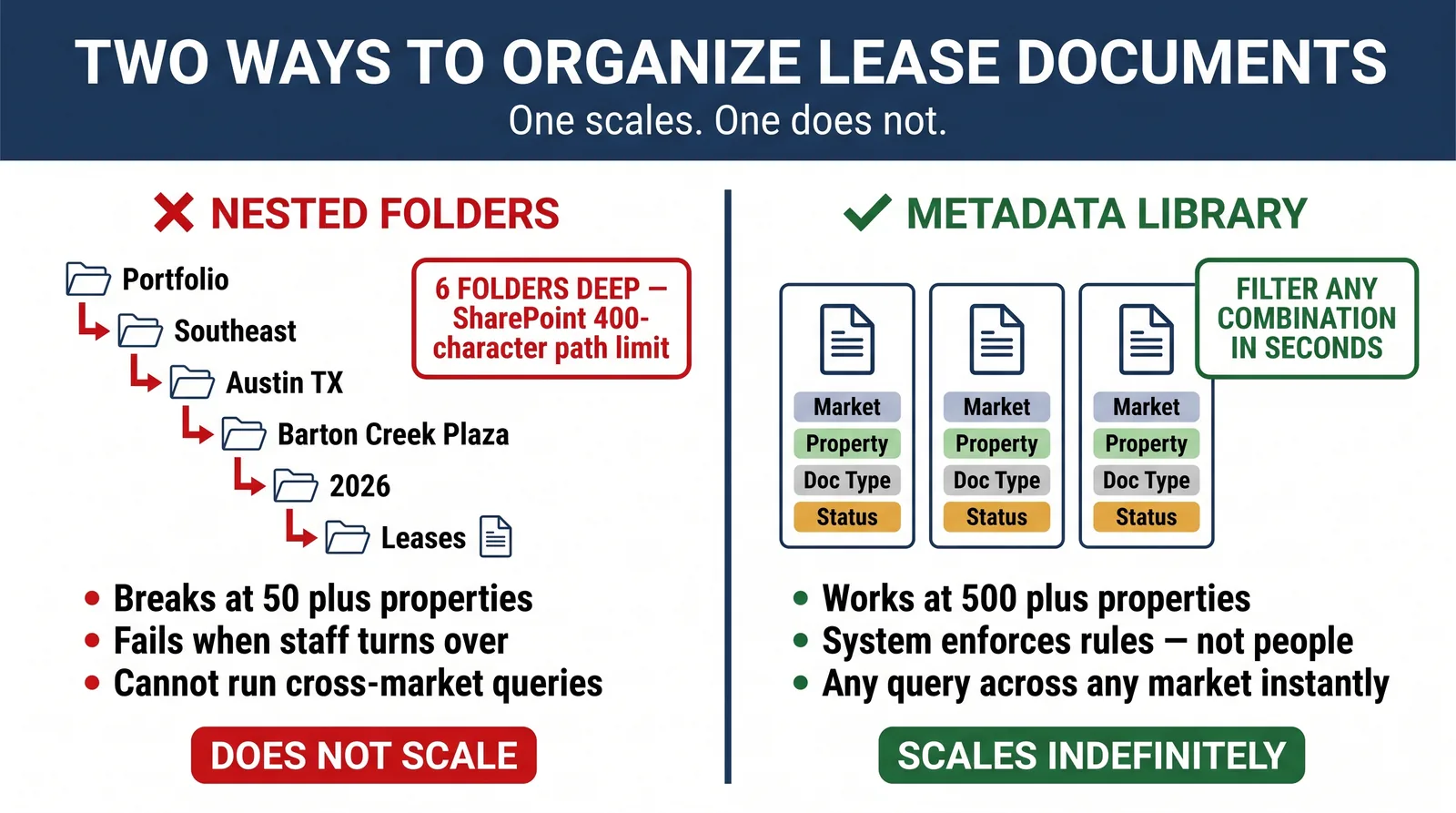
The most common folder pattern in a growing CRE portfolio mirrors the org chart. Region first. Then market. Then property. Then year. Then document type. By the time a user finds the right file, they have clicked through six folders.
However, this creates two concrete problems.
First, SharePoint Online has a hard 400-character limit on full file path lengths. At six folder levels — each with long, descriptive names — many teams hit that limit without knowing it. The result is silent upload failures and broken links. Documents appear saved but are not actually accessible.
Second, deep folder structures depend on shared team knowledge. The hierarchy made sense to the person who built it. But a new hire joining six months later often has no idea where things live. The same is true for a regional manager navigating a market they do not normally work in.
Problem 2: Inconsistent File Naming
Inconsistent naming is a systems problem — not a discipline problem.
When there is no enforced naming standard, every team member creates their own. "Austin_Lease_Final.pdf" and "ATX Executed Lease v3 SIGNED.pdf" and "lease-highland-park.PDF" can all represent the same document type. None of them sort correctly. None of them surface reliably in search.
According to McKinsey Global Institute, workers spend about 1.8 hours per day searching for information. That is roughly 20% of the workday. In CRE, a single lease amendment can represent millions of dollars in obligations. Therefore, poor search is not just a time waster — it is a business risk.
Problem 3: Missing Metadata
Metadata is the set of structured tags on a document. It is what makes large-scale search actually work. However, metadata only helps when it is complete.
In practice, most document libraries have metadata columns that are mostly empty. A "Property Name" field with 60% blank cells does not help anyone filter results. A "Document Type" column filled with free-text entries like "lease," "Lease," "executed lease," and "NNN lease orig" — all meaning the same thing — produces zero useful search results.
Additionally, the teams that succeed here do not ask users to fill in metadata voluntarily. They make it required. The system will not save a document without the right tags applied.
Step 1: Stop Using Deep Folders as Your Organization Strategy
The best way to organize lease documents across a multi-market portfolio is to flatten your library. Put the organizational work into metadata — not folder depth.
Limit folder depth to two levels maximum:
- Level 1: One folder per market group (Southeast, Midwest, Mountain West) — or a single root library for smaller portfolios
- Level 2 (optional): A broad Active vs. Archived split, only when retention or security rules require physical separation
Everything else — property, tenant, document type, date, status — becomes a metadata field. Not a folder.
The most common pushback is: "How does anyone find anything without folders?" That question comes from a shared-drive mindset. In a governed document library, people search and filter. They do not browse folder trees. Metadata turns any document attribute into a search filter.
For example, with a flat library and complete metadata, your team can find any document in seconds by combining filters:
- Market: Austin TX
- Property: Barton Creek Plaza
- Document Type: Estoppel Certificate
- Tenant: Fresh Market
- Status: Active
No folder browsing. No team knowledge required. No problem when new staff join.
There is also a second benefit. Microsoft Copilot — built into Microsoft 365 — indexes flat libraries cleanly. However, deep folder paths degrade AI search quality. Files buried at level six are effectively invisible to AI-powered search tools. The structure you choose today directly affects how well AI works for your team.
Step 2: Build a Property Taxonomy That Matches How Teams Think
A property taxonomy is a controlled list of terms that powers your metadata. Without it, metadata fields accept whatever text users type. With it, every field offers a dropdown list of approved terms. As a result, every entry is consistent, predictable, and searchable.
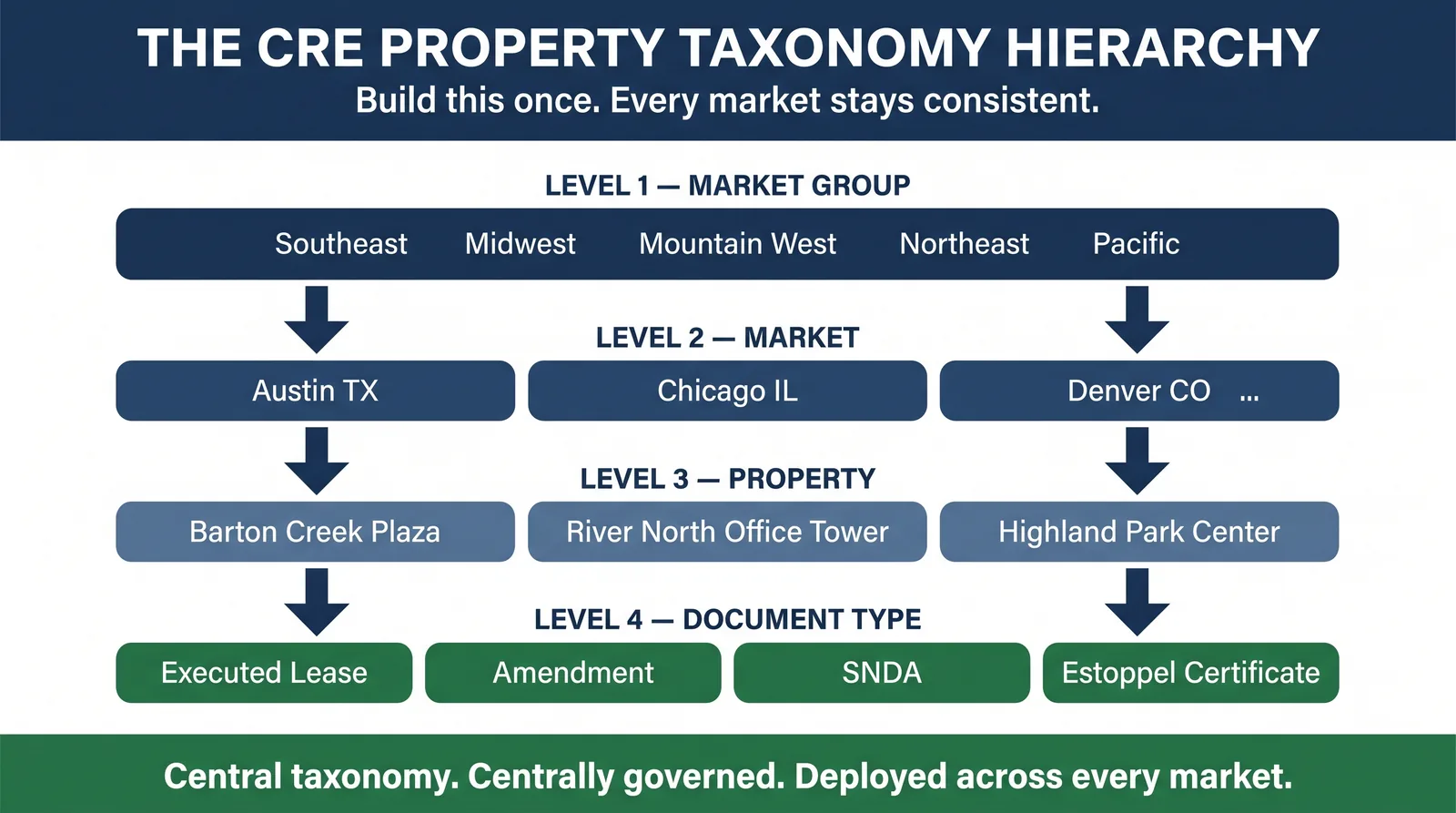
The right hierarchy for multi-market real estate document structure is:
Level 1 — Market Group
Broad regional groups that match your internal portfolio structure.
Examples: Southeast, Midwest, Mountain West, Northeast, Pacific
Level 2 — Market
Specific metro markets. Always include the state code to avoid naming conflicts.
Examples: Austin TX, Chicago IL, Denver CO, Atlanta GA
Level 3 — Property
Individual property names, each with a short, stable ID code.
Examples: Barton Creek Plaza (BCP-ATX), River North Office Tower (RNOT-CHI)
Level 4 — Document Type
The full list of document categories. Step 3 covers this in detail.
This order matches how CRE teams actually think — by region first, then market, then property, then document type. A taxonomy built in a different order fails every regional director who wants to see everything tied to a specific property.
One critical rule: the taxonomy must be centrally governed. If each regional team builds their own list, cross-market search breaks down completely. You cannot query "all estoppel certificates in the Southeast" if "Southeast" means something different in each regional SharePoint site.
Want this taxonomy layer built inside your existing SharePoint? ARC-Files designs and maintains the full property taxonomy for you — with no file migration. See how ARC-Files works.
Step 3: Define Your Full Document Type List
Most CRE document libraries use five or six generic document categories. However, a commercial lease generates far more distinct document types. Each type matters differently for search, compliance, and audit purposes.
A complete document type list for a commercial lease file includes at minimum:
- Executed Lease — the signed base agreement
- Lease Amendment — numbered in order: Amendment No. 1, Amendment No. 2
- Lease Renewal Agreement — extension or renewal documentation
- Letter of Intent (LOI) — pre-execution record of agreed terms
- Commencement Date Agreement — used when the start date differs from execution date
- SNDA — Subordination, Non-Disturbance and Attornment Agreement
- Estoppel Certificate — tenant-certified statement of current lease status
- Work Letter / Tenant Improvement Agreement
- Personal Guaranty
- Certificate of Insurance (COI) — keep tenant and landlord versions as separate entries
- Tenant Notice — formal correspondence with date and notice type recorded
- Side Letter — economic changes made outside the main lease document
- Assignment and Assumption Agreement
- Early Termination Agreement
- Rent Schedule / Exhibit
This is a starting point. Office portfolios add parking licenses. Retail portfolios add percentage rent calculations. Industrial portfolios add environmental indemnities. Every document type should have its own controlled term. Nothing should go into "Miscellaneous."
Here is why this matters in practice. When an auditor asks for all documents for a specific property during an ASC 842 review, they ask by document type. If those types are not distinct and searchable in your library, you rebuild that list by hand under time pressure. That is not a good position to be in.
Also, pay close attention to amendments. The base lease is just the starting point. Amendments often carry the current terms — the ones that control rent, term length, and renewal options. A missing amendment is not a filing issue. It is a compliance gap.
Step 4: Enforce Naming Conventions at Setup, Not After
Naming conventions fail when they live in a policy document nobody reads. They work when they are built into the upload process itself.
The right approach is a template that builds the file name automatically from metadata the user already entered. When someone selects "Executed Lease" as the document type, "Austin TX" as the market, and "Barton Creek Plaza" as the property, the system generates the file name. The user does not type it. They cannot change it.
Naming Convention Template
[YYYY-MM-DD]_[PropertyID]_[TenantShortName]_[DocumentType]_[v##]_[Status].pdf
Working examples:
| File Name | What It Tells You |
|---|---|
| 2026-03-15_BCP-ATX_FreshMarket_ExecutedLease_v01_SIGNED.pdf | Executed lease, Barton Creek Plaza Austin, Fresh Market, signed March 2026 |
| 2026-07-10_BCP-ATX_FreshMarket_Amendment02_v01_SIGNED.pdf | Second amendment to the same lease, signed July 2026 |
| 2026-07-22_BCP-ATX_FreshMarket_EstoppelCertificate_v01.pdf | Estoppel certificate, July 2026, not yet executed |
| 2025-11-01_RNOT-CHI_LakefrontAdvisors_COI_v01_ACTIVE.pdf | Certificate of insurance, River North Chicago, Lakefront Advisors |
The five parts that matter most:
- Date first in ISO format (YYYY-MM-DD) — every file system automatically sorts these by date
- Property ID — a short, stable code that survives property name changes and rebranding
- Document type from a controlled list — no freehand typing, no spelling drift over time
- Version number — makes document history readable without opening any file
- Status suffix — SIGNED, DRAFT, VOID, SUPERSEDED — prevents confusion when multiple versions exist in the library
The key rule: enforce naming at setup, not retroactively. At 10,000 documents, cleaning up old file names is a significant project. At 100,000 documents, it takes months and dedicated tools. The right time to enforce naming is before the first document enters the library — not after thousands already have.
Step 5: Use Metadata Instead of Folders for Large-Scale Search
Metadata-based search is what separates a library that works at 50 properties from one that still works at 500.
The rule is simple: every attribute someone might search on should be a metadata field. Not a folder. Not buried inside a file name. Not stored in a spreadsheet someone has to remember to update.
The core metadata fields every CRE lease library needs:
| Metadata Field | Field Type | Example Values |
|---|---|---|
| Market Group | Managed term | Southeast, Midwest, Mountain West |
| Market | Managed term | Austin TX, Chicago IL, Denver CO |
| Property | Managed term | Barton Creek Plaza, River North Office Tower |
| Document Type | Managed term | Executed Lease, Lease Amendment, SNDA, Estoppel |
| Tenant Name | Managed term | Fresh Market, Lakefront Advisors |
| Execution Date | Date | 2026-03-15 |
| Expiration Date | Date | 2031-03-14 |
| Document Status | Managed term | Active, Expired, Pending Execution, Superseded |
| Version | Number | 1, 2, 3 |
| Deal Stage | Managed term | Active, Under Renewal, Disposition, Closed |
| Last Modified By | Person | Auto-populated by system |
| Retention Schedule | Managed term | 7-Year, Permanent, 3-Year |
Fields marked Managed term pull from the controlled taxonomy. Users pick from a list. They cannot type their own value. This stops "Fresh Mkt" from appearing alongside "Fresh Market" in your search results.
With full metadata in place, your team can:
- Pull every lease expiring in the next 90 days — one query, all markets
- Find every document tied to a specific tenant across all properties
- Export all documents accessed in the last 30 days for an audit
- Flag every SNDA in the Mountain West region by status
- Sort all executed lease amendments by date across the whole portfolio
None of these queries require folder browsing. However, all of them require complete and consistent metadata. A flat library with mostly empty metadata fields is no better than a deep folder tree. The flat structure and the metadata enforcement have to go together.
Folder-Based vs. Metadata-Based: A Direct Comparison
The gap between these two approaches grows as the portfolio grows.
| Dimension | Folder-Based Structure | Metadata-Based Library |
|---|---|---|
| Primary navigation | Manual folder browsing | Filter by any metadata field |
| Works at 30–50 properties | Yes | Yes |
| Works at 200+ properties | No — performance degrades | Yes |
| Survives staff turnover | Only with good documentation | Yes — the system enforces the rules |
| Multi-dimension queries | Not possible without manual work | Yes — combine any fields |
| Audit document requests | Manual file-by-file assembly | Filtered export in minutes |
| Naming convention enforcement | Voluntary | Enforced at upload |
| SharePoint path length issues | Frequent at 5+ folder levels | Rare — flat structure stays within limits |
| New property onboarding | Manual folder setup each time | Template-based, automatic |
| Compatible with Microsoft Copilot | Degraded — AI skips deep paths | Strong — indexes cleanly |
| Cross-market search | Must navigate multiple library roots | Single query across the full portfolio |
The bottom row is increasingly important. As Microsoft Copilot becomes a standard tool in CRE operations, the document library structure determines how well AI-powered search works. Nested folder trees actively limit what AI can retrieve. Flat libraries with clean metadata return precise results. The structure you build today affects AI performance in your team tomorrow.
Sample Term Set Structure
Below is a sample term set for a multi-market CRE portfolio. In SharePoint's Term Store, this becomes the managed metadata backbone that powers every dropdown field in your document library.
Portfolio Taxonomy
├── Market Groups
│   ├── Southeast
│   │   ├── Atlanta GA
│   │   ├── Austin TX
│   │   └── Nashville TN
│   ├── Midwest
│   │   ├── Chicago IL
│   │   ├── Columbus OH
│   │   └── Minneapolis MN
│   └── Mountain West
│       ├── Denver CO
│       ├── Phoenix AZ
│       └── Salt Lake City UT
│
├── Document Types
│   ├── Lease Documents
│   │   ├── Executed Lease
│   │   ├── Lease Amendment
│   │   ├── Lease Renewal Agreement
│   │   ├── Letter of Intent
│   │   ├── Commencement Date Agreement
│   │   └── Early Termination Agreement
│   ├── Tenant Certifications
│   │   ├── Estoppel Certificate
│   │   ├── SNDA
│   │   └── Certificate of Insurance
│   └── Supporting Documents
│       ├── Work Letter
│       ├── Personal Guaranty
│       ├── Side Letter
│       ├── Rent Schedule / Exhibit
│       ├── Assignment and Assumption Agreement
│       └── Tenant Notice
│
└── Document Status
    ├── Active
    ├── Expired
    ├── Pending Execution
    ├── Superseded
    └── Void
This structure lives inside SharePoint's Term Store. It needs no third-party tool and no extra license. However, it does need careful design upfront and ongoing updates as the portfolio changes — new markets added, old properties retired, new document types introduced.
In practice, the teams that keep a clean term set treat taxonomy updates as part of the property-add checklist. It is not an afterthought. It is step one.
How CRE Lease Management Software Makes This Work
A good framework is a starting point. But a framework that runs on manual effort and good intentions falls apart fast.
A new hire skips the naming convention. A regional team imports old folder structures. Someone uploads an amendment to the wrong property because the term set never got updated. The disorder is predictable — and it compounds.
This is where CRE lease management software like ARC-Files changes how the system operates.
Automatic property setup. When you add a new property, ARC-Files creates the document library, applies the taxonomy, assigns permissions, and sets up the full document type list — automatically. There is no manual setup. There is no dependency on who remembers the rules.
Required metadata at upload. You cannot save a document without filling in the required fields. No Document Type, no save. No Expiration Date, no save — instead, an exception workflow fires. As a result, metadata completeness becomes structural, not optional.
Expiration alerts across all markets. The system scans the Expiration Date field across the full portfolio on a schedule. It surfaces every document expiring in the next 30, 60, or 90 days — one view, every market, every property. No spreadsheet. No manual calendar.
Full audit log, automatic. Every document access, edit, permission change, and metadata update is logged. When an auditor requests the full activity record for a specific lease, you export it in minutes. There is nothing to reconstruct.
Precise portfolio-wide search. Because every document has complete, consistent metadata, search returns exact results. For example, "all estoppel certificates across Chicago properties from the last 24 months" is a three-filter query that runs in seconds — not a day-long manual process.
ARC-Files runs all of this inside your existing Microsoft 365 setup. No data migration. No new cloud platform. No rebuilding what you already have. The governance layer sits on top of SharePoint. Your files stay where they are. Your team gets a library that holds at scale.
Frequently Asked Questions
How do you organize lease documents for multiple properties?
The most effective approach is a flat document library with controlled metadata — not nested folders. Build a property taxonomy with Market Group, Market, Property, and Document Type as managed metadata fields. Apply a standard naming convention at setup so every document enters the system with a consistent, searchable name. This structure scales to hundreds of properties because search filters replace folder browsing.
What documents should be in a commercial lease file?
A complete commercial lease file needs: the executed base lease, all amendments numbered in order, any commencement date agreements, letters of intent, SNDAs, estoppel certificates, work letters, personal guaranties, certificates of insurance for both parties, tenant notices, side letters, and the current rent schedule. Amendments are the most commonly missing item. However, they often carry the current terms that control rent, term length, and renewal options. A missing amendment is a compliance gap — not just a filing issue.
What is a document taxonomy in commercial real estate?
A document taxonomy is a controlled list of terms used to classify and organize documents across a portfolio. In CRE, it follows a clear hierarchy: Market Group > Market > Property > Document Type > Deal Stage. When you build it as managed metadata in SharePoint's Term Store, every document gets tagged consistently — regardless of who uploads it. As a result, any team member can search by market, tenant, document type, or date and get precise results.
What naming convention should I use for commercial lease documents?
Use this format: [YYYY-MM-DD]_[PropertyID]_[TenantShortName]_[DocumentType]_[v##]_[Status].pdf. Date first in ISO format gives you automatic chronological sorting. Property ID stays stable through name changes. Document Type drawn from a controlled list prevents spelling drift. Version and Status make document history readable at a glance. Most importantly, enforce this at upload — build names from metadata fields automatically rather than asking users to type them.
How do you keep lease documents consistent across multiple markets?
Consistency across markets needs three things. First, a single centrally governed taxonomy — not a separate list per regional team. Second, a setup template that applies the same library structure to every new property. Third, metadata enforcement that blocks documents from saving without complete tags. When regional teams build their own systems, cross-market search fails immediately — there is no shared vocabulary to query against. The taxonomy must be centrally managed, even when it is used across different regions.
When does a folder-based system stop working for a lease document library?
Folder-based systems start breaking down around 30 to 50 properties. Below that, a small team can share a mental model of where things live. Above it, the folder structure depends on shared knowledge that does not survive staff turnover. By 100 or more properties across multiple markets, running cross-market queries, assembling audit documents, and tracking expiration dates all become manual projects — measured in analyst-days, not minutes.
The Bottom Line
To organize lease documents across a multi-market portfolio in a way that holds at 500 properties as well as it holds at 50, you need to make five decisions correctly:
- Flatten the library — two folder levels max; let metadata carry the organization
- Build a governed taxonomy — Market Group > Market > Property > Document Type, enforced as controlled terms
- Define a complete document type list — every category gets its own term; nothing goes into "Other"
- Enforce naming at setup — build file names from metadata fields automatically
- Make metadata required — empty fields break the system; enforcement must be structural
These are governance decisions. The technology to support them already exists inside Microsoft 365. However, what most multi-market CRE portfolios lack is the layer that makes the system enforce itself — so the rules hold regardless of who uploads the next file or how fast the portfolio grows.
That is exactly what ARC-Files delivers. A governance layer that makes SharePoint work the way enterprise CRE teams need — without moving a single file out of the environment you already use.
Ready to build a lease document library that stays organized across every market, every property, and every team member? Talk to the ARC-Files team.
This article is part of ARC-Files' series on real estate document management software for enterprise CRE portfolios. For a full overview of features every CRE document system needs, start with the complete guide.
Keep reading
Suggested Articles
Continue exploring document management, SharePoint governance, and compliance for commercial real estate teams.