Real Estate Document Management Software: The Complete 2026 Guide
What real estate document management software does, the 8 features every CRE enterprise must have, and how to choose between a migration-heavy DMS and a SharePoint-native platform like ARC-Files.
Published July 25, 2026 · By ARC-Files · 16 min read
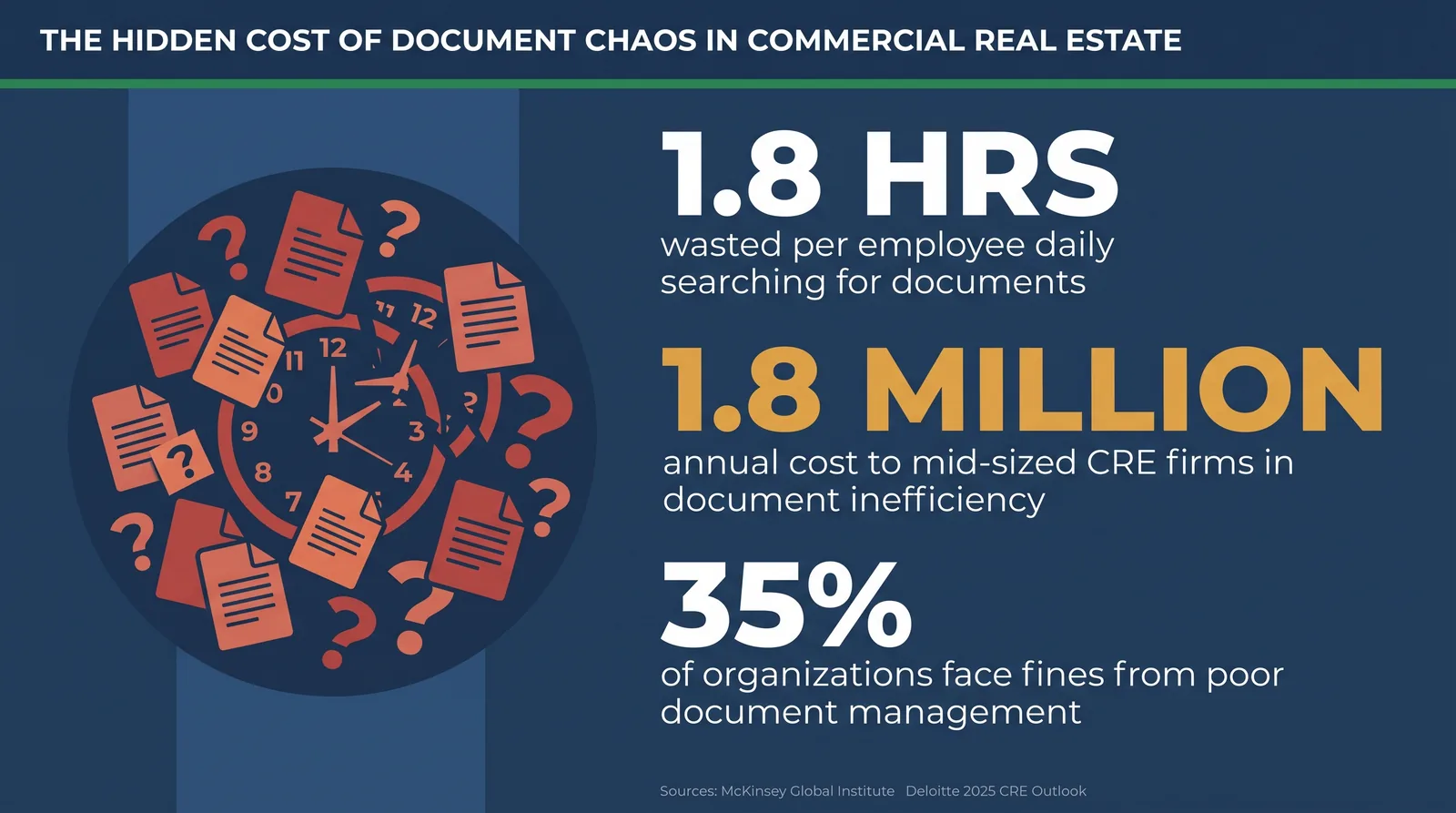
Finding one document in a large real estate portfolio takes 18 minutes on average. Do that math across a 20-person team. You lose roughly 100 hours every single week — just on search.
McKinsey Global Institute found that workers spend 1.8 hours per day looking for information. In commercial real estate, that time means missed deals, failed audits, and real dollars lost.
Real estate document management software solves this problem. It is not just a storage tool. It is a governance system. And in 2026, it is one of the most important investments a CRE team can make.
This guide covers everything you need to know. You will learn what real estate document management software does, the 8 features every CRE enterprise must have, how to choose the right platform, and how to run a smart vendor review.
Key Takeaways
- Poor document management costs mid-sized real estate firms about $1.8 million per year, based on 2025 industry data.
- The global real estate document management software market will grow from $8.32 billion in 2025 to $24.34 billion by 2032 at a 16.6% annual growth rate.
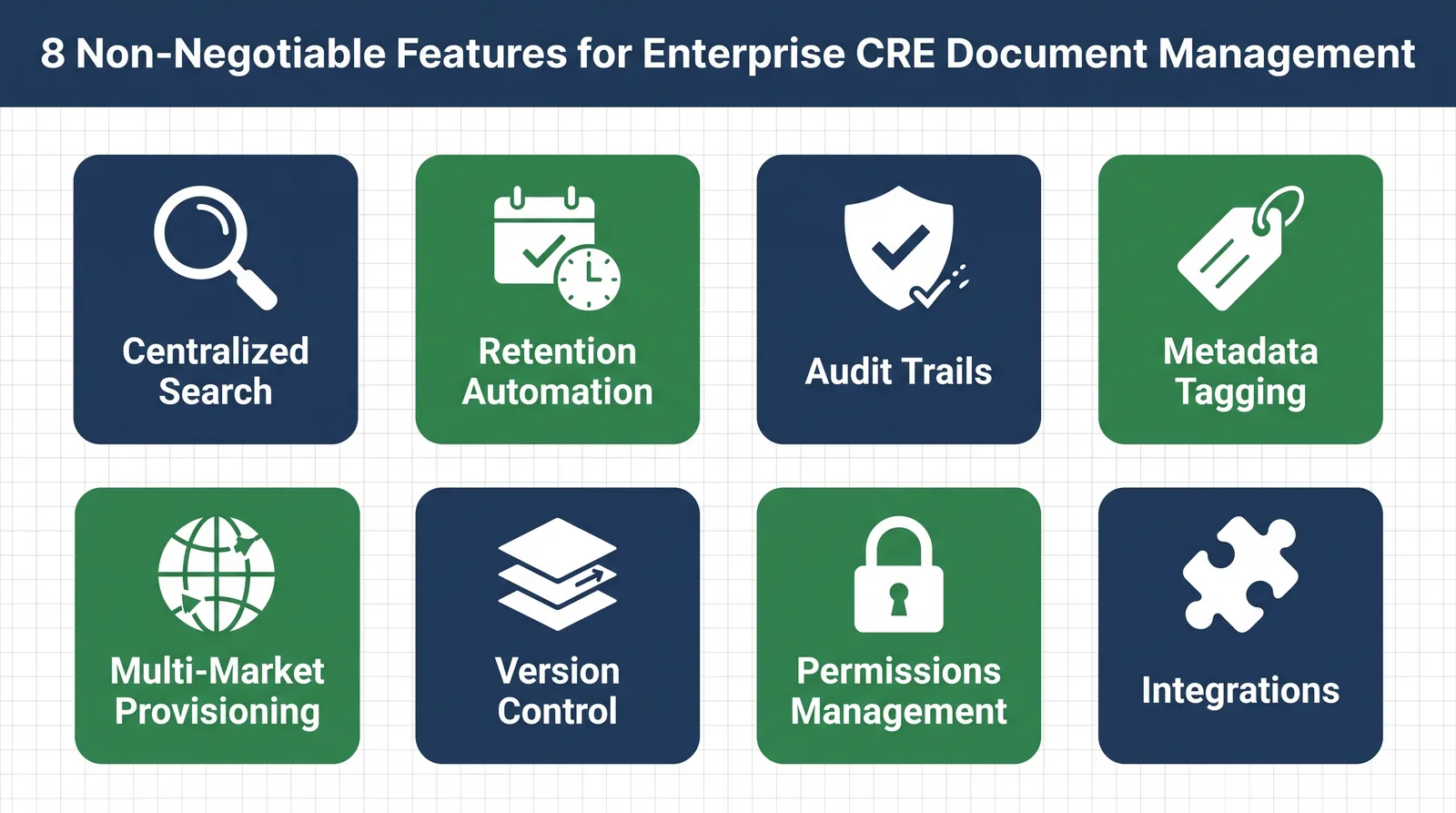
- The 8 must-have features for enterprise CRE are: centralized search, retention automation, audit trails, metadata tagging, multi-market provisioning, version control, permissions management, and system integrations.
- Migration-heavy DMS platforms like M-Files and DocuWare can cost $75,000 to $300,000+ and take 6–12 months to set up.
- ARC-Files is SharePoint-native real estate document management software. It adds enterprise controls directly to Microsoft 365 — no data migration needed.
What Is Real Estate Document Management Software?
Real estate document management software is a digital system for storing, finding, and controlling CRE documents. Those documents include leases, amendments, title reports, environmental studies, insurance certificates, due diligence files, and board minutes.
The key word is control. A shared drive like Google Drive or Dropbox stores files. However, it does not govern them. Real estate document management software does both — it stores files and applies rules to them.
Here is what that means in practice:
- It enforces consistent tags so every file is labeled the same way.
- It controls who can see, edit, or share each document.
- It tracks every version, every access, and every change automatically.
- It runs retention and expiration workflows without manual input.
- It makes any document findable in seconds — across every market and every property.
Why CRE Is Different From Other Industries
CRE creates a document problem that most industries never face. Consider the scale. A firm managing 100 properties across 15 markets generates tens of thousands of documents per year. Each one has compliance weight. Each one may need to be found fast by one of a dozen different people.
Additionally, the rules are strict. Standards like ASC 842 and IFRS 16 require precise lease records. REITs face SEC disclosure rules. Most states have their own retention laws. Internal auditors add their own requirements on top of all that.
Therefore, generic storage tools fail CRE teams. A commercial real estate DMS is built for this environment. A shared folder is not.
The Multi-Market Portfolio Problem
Before you evaluate any real estate document management software, you need to understand the problem clearly. Most CRE teams share the same four failures.
Scattered Lease Files
In a multi-market portfolio, lease documents rarely live in one place. Some sit in a leasing team's shared drive. Others live in an asset manager's OneDrive. More are buried in someone's email. Some hide in a SharePoint library no one has touched in two years.
However, this only becomes visible when someone needs a file fast. A regional director running a portfolio-wide lease review has to chase files across four systems. That process takes days, not minutes. Good real estate document management software fixes this by putting everything in one searchable place.
Missed Expiration Dates
No one intentionally misses a lease expiration or insurance renewal. But when key dates are buried inside documents — not surfaced by alerts — misses happen. The results are painful: an auto-renewed lease on bad terms, a lapsed insurance certificate that voids coverage, a lender covenant breach that triggers a call.
Real estate document management software with built-in expiration alerts removes this risk. The system watches the dates so your team does not have to.
Failed Audits
Audit failures in CRE rarely happen because documents do not exist. They happen because teams cannot produce documents quickly in an organized form. Industry research shows 35% of organizations have faced fines or legal action due to poor document management — that is more than one in three firms.
When an auditor asks for every amendment to a specific lease over 10 years, “let me search our files” is not an acceptable answer. Real estate document management software gives you that answer in seconds.
Hours Spent Searching
The search problem is bigger than most people realize. AgilityPortal research shows the average employee spends 4 to 6 hours per week looking for documents. Across a 20-person operations team, that adds up to over 100 wasted hours every week.
Deloitte's 2025 CRE Outlook found that 81% of CRE leaders named data and technology as their top spending priority. A major reason is that document chaos has become too expensive to accept. The right real estate document management software turns that loss into recovered time.
The 8 Non-Negotiable Features CRE Enterprises Need
Not all real estate document management software is built for enterprise CRE. Many platforms handle basic storage. However, they miss the governance features that multi-market portfolios need. These 8 features separate enterprise-grade CRE document software from the rest.
1. Centralized Search Across All Libraries
Good real estate document management software does not make you guess which folder to search first. One search bar should query every document across every market, every property, and every library at the same time. Results should come back by tag, content, filename, or property attribute — teams managing 50+ properties cannot use a search tool that requires knowing the folder path in advance.
2. Retention Automation
Document retention in CRE is a legal need, not a preference. Executed leases often must be kept for the life of the lease plus seven years, and environmental reports, insurance files, and capital improvement records each follow their own rules. Real estate document management software should apply retention labels the moment a file is uploaded, trigger review workflows when documents are due for deletion, and log every retention decision as a permanent record.
3. Audit Trails
Every time someone opens, edits, approves, or shares a document, that event should create a permanent, timestamped record. Auditors ask who accessed a document and when; lawyers ask which version was active on a given date; compliance teams ask whether an amendment was reviewed before signing. A governed system answers all three automatically — an audit trail built in a spreadsheet does not hold up.
4. Metadata Tagging and Taxonomy Enforcement
Search only works when documents are tagged correctly, and metadata only works when everyone uses the same tags. At scale, taxonomy drift sets in: different team members use different terms, fields get left blank, old files never get tagged. Enterprise real estate document management software enforces a controlled tag system — not free-text guesses — and flags missing or wrong tags for cleanup.
5. Multi-Market Provisioning
When your firm enters a new market or buys a new property, the document system for that market should be ready in hours. Multi-market provisioning builds a new market structure from a template — folder layout, tag schema, permissions, and retention rules all pre-applied. If you buy three properties per quarter, you cannot afford a two-week manual setup for each one.
6. Version Control
Leases rarely arrive in final form — they go through 8 to 12 rounds of edits before signing. Without version control, teams end up with six files all named "Lease_Final" and no way to know which one is current. Real estate document management software with version control keeps a full history of every draft, clearly marks the current version, and stops people from overwriting each other's work.
7. Role-Based Permissions Management
Not everyone should see every document — a junior administrator should not have the same access as an external broker. Enterprise CRE DMS platforms assign permissions to roles, not individuals, and apply them consistently across every market and property. For multi-market firms, permissions also need geographic limits, and external parties need controlled, time-limited access to specific documents only.
8. Integrations With Core CRE Systems
CRE operations teams use many platforms — Yardi, MRI, RealPage, lease administration software, ERP systems, financial reporting platforms. A system that requires manual re-entry between tools recreates the split-data problem it was meant to solve. Look for native integrations with tools already in your stack, plus email, e-signature, and single sign-on support at minimum.
Migration-Heavy DMS vs. SharePoint-Native
Most CRE software evaluations come down to one big decision. Most teams underestimate how much it matters. Here is a clear look at both paths.
The Traditional DMS Path
The traditional market for commercial real estate DMS software has strong platforms. M-Files and DocuWare are well-known options. However, they are proprietary systems. To use them, you must move your existing documents out of SharePoint — or wherever they live — and into the vendor's own cloud.
That migration is not a simple project. It is a multi-month program with real risk. For mid-market organizations, a managed migration typically costs $75,000 to $150,000. For large enterprises with more than 5TB of files and complex compliance needs, costs can exceed $300,000. Timeline: 6 to 12 months.
Additionally, once your documents live in a proprietary system, leaving means another full migration. Your data is locked in. And per-user licensing for dedicated DMS platforms tends to cost far more than a governance layer built on licenses you already own.
The SharePoint-Native Path
The alternative is a SharePoint-native governance layer. This type of real estate document management software deploys directly into your existing Microsoft 365 environment. It adds enterprise CRE controls on top of SharePoint — without moving a single file.
ARC-Files works this way. Instead of migrating years of documents into a new system, ARC-Files adds 20 SharePoint Framework (SPFx) modules to the Microsoft 365 environment your team already uses. Centralized search, retention automation, audit trails, metadata governance, and multi-market provisioning all run inside SharePoint. Not next to it.
The result is enterprise-grade CRE document software with zero migration cost and a 2- to 4-week setup. Your data stays exactly where it already lives.
Side-by-Side Comparison
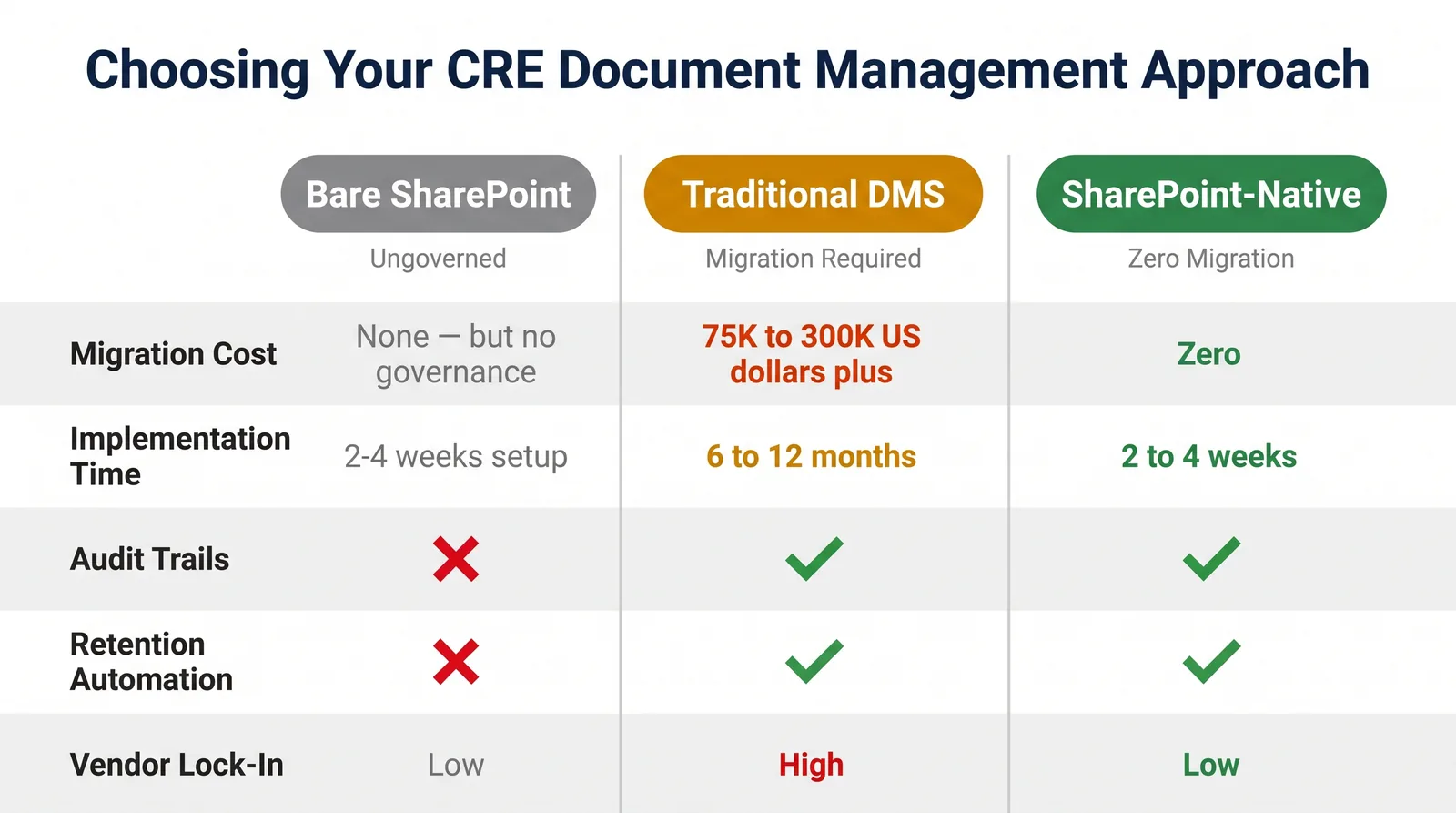
The table below compares the three most common approaches CRE teams evaluate:
| Feature / Factor | Bare SharePoint | Traditional DMS | ARC-Files |
|---|---|---|---|
| Migration Required | None | Yes — full migration | None — uses existing files |
| Implementation Time | Weeks (no governance) | 6–12 months | 2–4 weeks |
| Migration Cost | $0 | $75,000–$300,000+ | $0 |
| Centralized Search | Per-library only | ||
| Retention Automation | Manual only | ||
| Audit Trails | Basic logs only | ||
| Metadata Enforcement | |||
| Multi-Market Provisioning | Manual setup | ||
| Role-Based Permissions | Basic SharePoint only | ||
| M365 Integration | Native | Connectors needed | Native (built on M365) |
| Vendor Lock-In Risk | Low | High | Low (data stays in SharePoint) |
| Compliance Automation |
The teams that get the most value from real estate document management software are those already using Microsoft 365. For them, the SharePoint-native path avoids the biggest risks — migration failure, cost overruns, and lock-in — while delivering the same enterprise controls.
How to Evaluate Real Estate Document Management Software
Use this four-phase framework when you review vendors. It will save you months of back-and-forth.
Phase 1: Define Your Must-Haves
Before you talk to any vendor, answer these questions as a team.
- How many properties and markets do you manage today? How many in three years?
- Which document types carry the most compliance risk? Leases? Environmental reports? Insurance certificates?
- What regulations apply to your firm? ASC 842? IFRS 16? REIT SEC rules? State retention laws?
- Which platforms must the document system connect to? Yardi? MRI? DocuSign? Salesforce?
- Does your team have internal SharePoint capacity, or do you need vendor-led setup?
Write the answers down before you take a single demo. This step alone will cut your shortlist in half.
Phase 2: Score Every Vendor on the 8 Features
Rate each vendor on all 8 features covered above. Ask for live demos — not slide decks. During each demo, focus on four things:
- Metadata at upload. Are fields required or optional? What happens if someone skips a tag?
- Audit trail structure. Can you export it? What format does it use for regulators?
- Market provisioning. Is it template-based or manual? How long does it take?
- External access. How do brokers, investors, and attorneys get in — and get out?
Phase 3: Calculate the Real Cost
Most buyers focus on license fees and miss the real numbers. Factor in all of these when you compare real estate document management software options:
- Data migration cost, if the platform needs one
- Setup and configuration fees
- Training and change management costs
- Ongoing support and custom development
- Cost to switch platforms in three years
For SharePoint-native real estate document management software, also check whether your existing M365 licenses cover the platform or whether extra licenses apply.
Phase 4: Test With Your Actual Files
Request a proof of concept using real files from your portfolio. Use a few hundred documents from one actual market. Apply your real tag requirements. Run your actual search queries.
Generic demos with vendor sample data tell you almost nothing. Your real files — with your naming gaps, your legacy mess, your permission complexity — will show you the truth fast.
Ready to see ARC-Files with your actual portfolio data?
ARC-Files is the only SharePoint-native real estate document management software built specifically for enterprise CRE teams. It delivers centralized search, compliance automation, and metadata governance across your full Microsoft 365 environment — with zero data migration required.
Frequently Asked Questions
What is real estate document management software?
Real estate document management software is a digital system for storing, finding, and controlling access to CRE documents. It covers leases, amendments, title reports, environmental studies, insurance certificates, and more. Unlike a shared drive, it enforces consistent tags, automates retention workflows, tracks every access event in an audit trail, and makes any file findable across a full multi-market portfolio in seconds.
What key features should I look for in real estate document management software?
Look for eight core features: centralized search across all libraries, automated retention with policy rules, permanent audit trails, managed metadata tagging, multi-market provisioning from templates, full version control, role-based permissions for internal and external users, and integrations with platforms like Yardi and MRI. In practice, centralized search and audit trails are the two features most commonly missing from generic tools that CRE teams try to adapt.
What is the difference between SharePoint and a dedicated DMS for commercial real estate?
Out-of-the-box SharePoint stores documents but lacks the governance features CRE enterprises need. It has no enforced metadata, no automated retention, no permanent audit trails, and no centralized search across multiple site collections. Dedicated DMS platforms like M-Files and DocuWare add those features. However, they require migrating documents to a vendor-owned cloud — a process that can cost $75,000 to $300,000+ and take 6 to 12 months. A third option — SharePoint-native real estate document management software like ARC-Files — adds enterprise CRE controls directly into Microsoft 365, with no migration and a 2- to 4-week setup.
How does real estate document management software improve compliance?
It improves compliance in three direct ways. First, retention automation applies document retention rules at the point of filing and triggers review workflows at expiration — no manual tracking needed. Second, audit trails create permanent records of every access, edit, and approval event. Those records are what ASC 842, IFRS 16, and SEC auditors ask for first. Third, metadata enforcement means you can produce any document on demand by property, type, or date range. As a result, the last-minute scramble before every audit goes away.
What are the risks of poor document management in commercial real estate?
The risks fall into four categories. First, financial penalties: industry research shows 35% of organizations have faced fines or legal action from poor document management. Second, deal risk: disorganized due diligence files delay acquisitions and sometimes kill deals. Third, compliance exposure: missed lease expirations, lapsed insurance certificates, and incomplete audit trails lead to regulatory penalties. Fourth, productivity loss: document problems account for 21.3% of knowledge worker productivity loss — roughly $19,732 per person per year.
How long does it take to implement real estate document management software?
It depends on the approach you choose. Traditional migration-heavy DMS platforms typically take 6 to 12 months for enterprise setups. Most of that time goes into data migration, tag mapping, and training. SharePoint-native real estate document management software like ARC-Files deploys in 2 to 4 weeks for an initial market. After that, additional markets are provisioned from templates in hours. The biggest variable is data quality. Teams with consistent existing tags deploy much faster than teams with years of untagged legacy files.
The Bottom Line
The CRE industry is generating more documents, in more markets, under more regulatory pressure than ever before. As of 2025, poor document management costs mid-sized firms an estimated $1.8 million per year. That number grows with your portfolio.
The solution is clear. Real estate document management software is no longer a niche IT project. It is core operational infrastructure. It directly affects how fast you close deals, how well you pass audits, and how much time your team recovers every day.
The most important decision is not which vendor has the nicest interface. It is whether you want to migrate your documents into a proprietary system — with all the cost, risk, and lock-in that brings — or govern them inside the Microsoft 365 environment where they already live.
For enterprise CRE teams already using Microsoft 365, ARC-Files is the direct answer. It is purpose-built real estate document management software with 20 SPFx modules that add centralized search, retention automation, audit trails, metadata governance, and multi-market provisioning directly to SharePoint. No migration. No new data silo. No six-figure setup project before you see results.
However, the biggest shift is not the software. It is the mindset. The teams that treat document governance as infrastructure — not as a filing task — are audit-ready before the auditor calls. They find any lease in under 30 seconds. And when they enter a new market, their document system is live the same week.
That is the standard. ARC-Files helps you reach it.
Keep reading
Suggested Articles
Continue exploring document management, SharePoint governance, and compliance for commercial real estate teams.