Enterprise Document Search for Real Estate: Why Finding One File Takes 40 Minutes
A practical breakdown of why document retrieval fails in CRE portfolios and how centralized search architecture, metadata governance, and SharePoint-native controls fix it.
Published August 3, 2026 · By ARC-Files · 15 min read
Published: August 3, 2026 | By ARC-Files
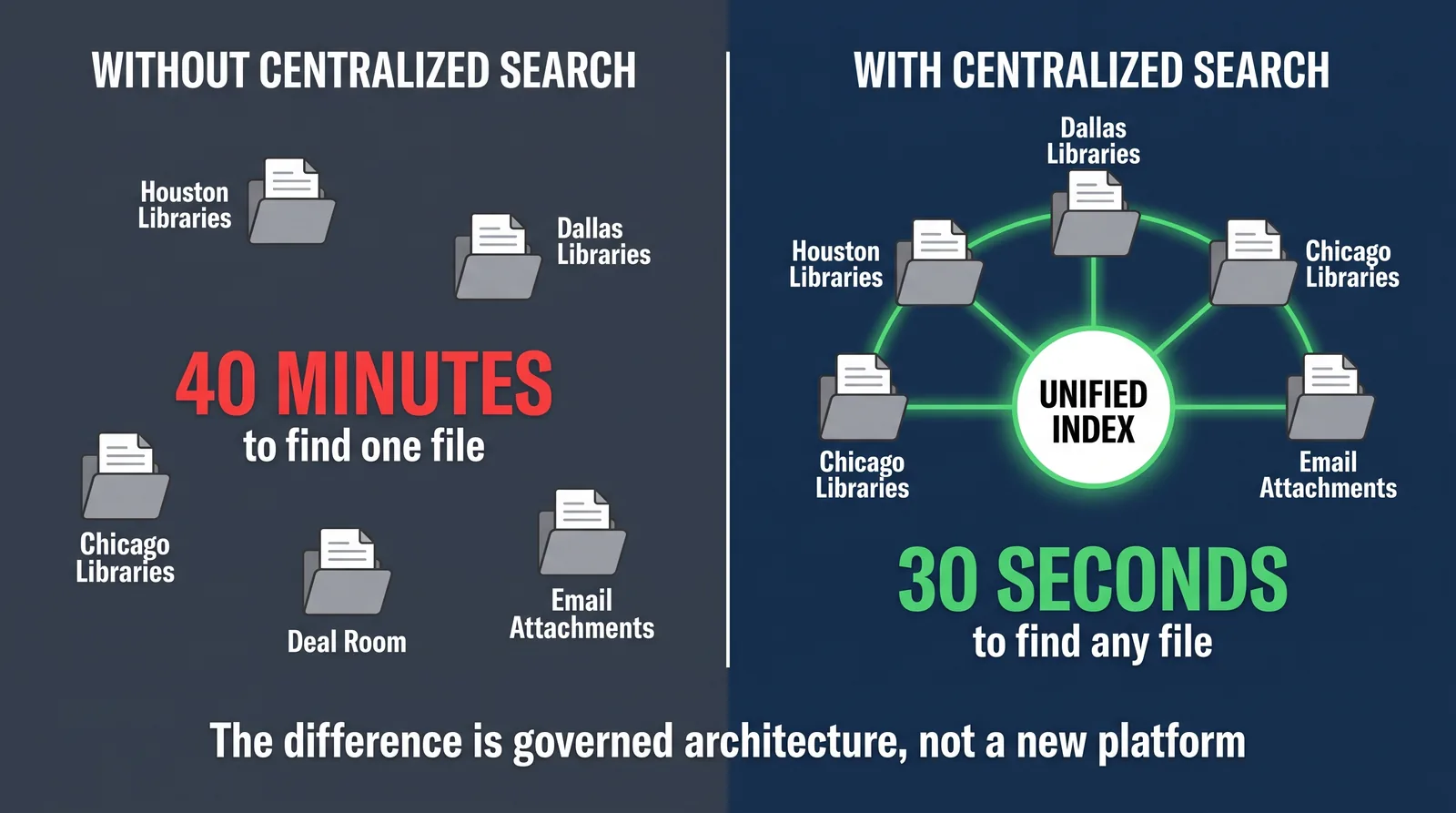
A deal is closing in three days. The executed lease amendment exists, but the team cannot immediately tell whether it is in a market SharePoint library, a regional folder, an email attachment, or a personal OneDrive copy from a prior transaction.
That 40-minute file hunt is not a user-discipline problem. It is an information architecture problem. In commercial real estate, fragmented storage, inconsistent naming, and missing metadata make search unpredictable even when every document technically exists.
This guide explains why enterprise document search fails in CRE environments and what architecture actually delivers reliable, fast retrieval at portfolio scale.
Key Takeaways
- Enterprise document search in CRE fails when storage scales faster than governance, not because users do not search correctly.
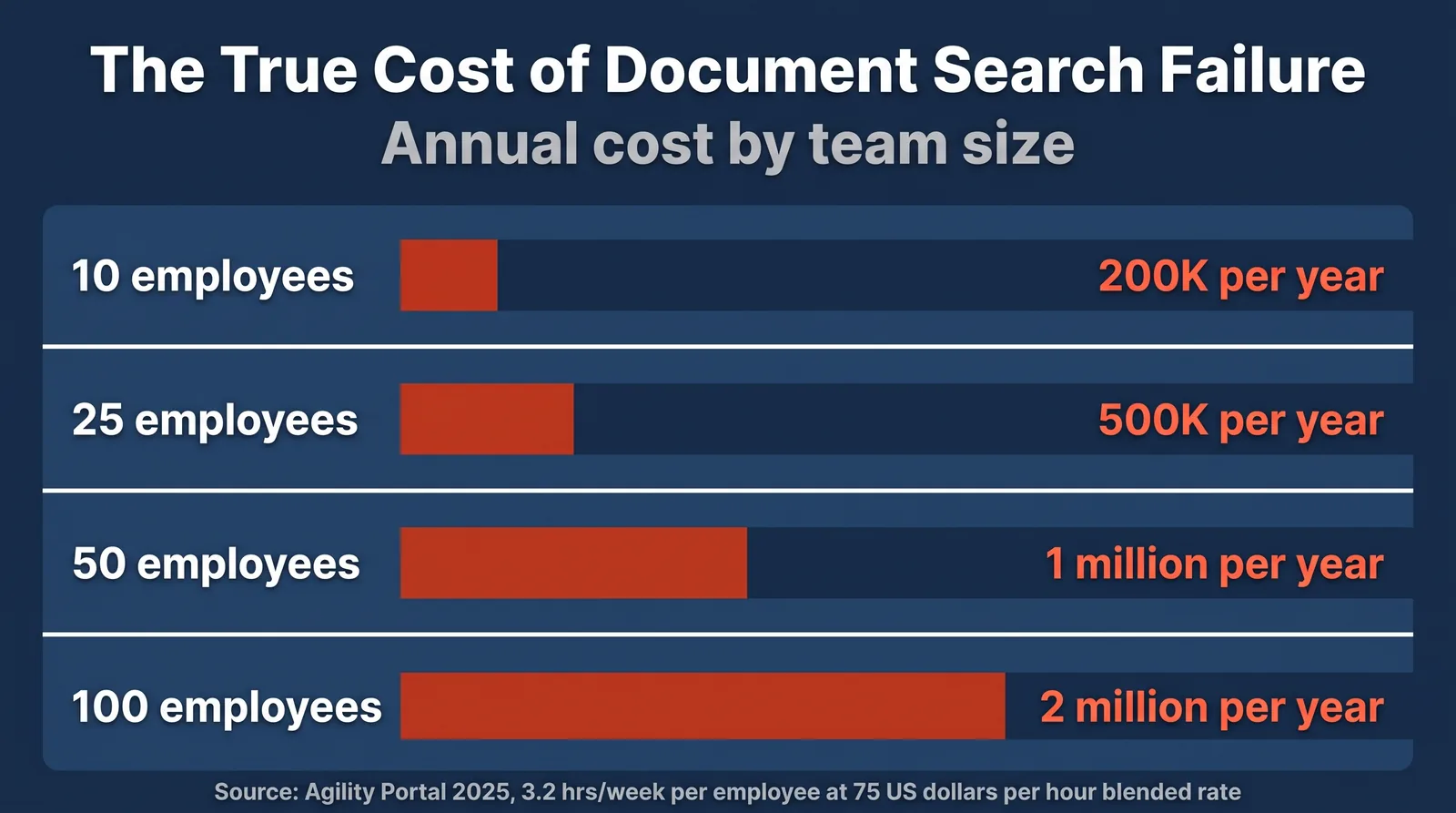
- Findability cost is material: repeated search time compounds into hundreds of lost hours per team each year.
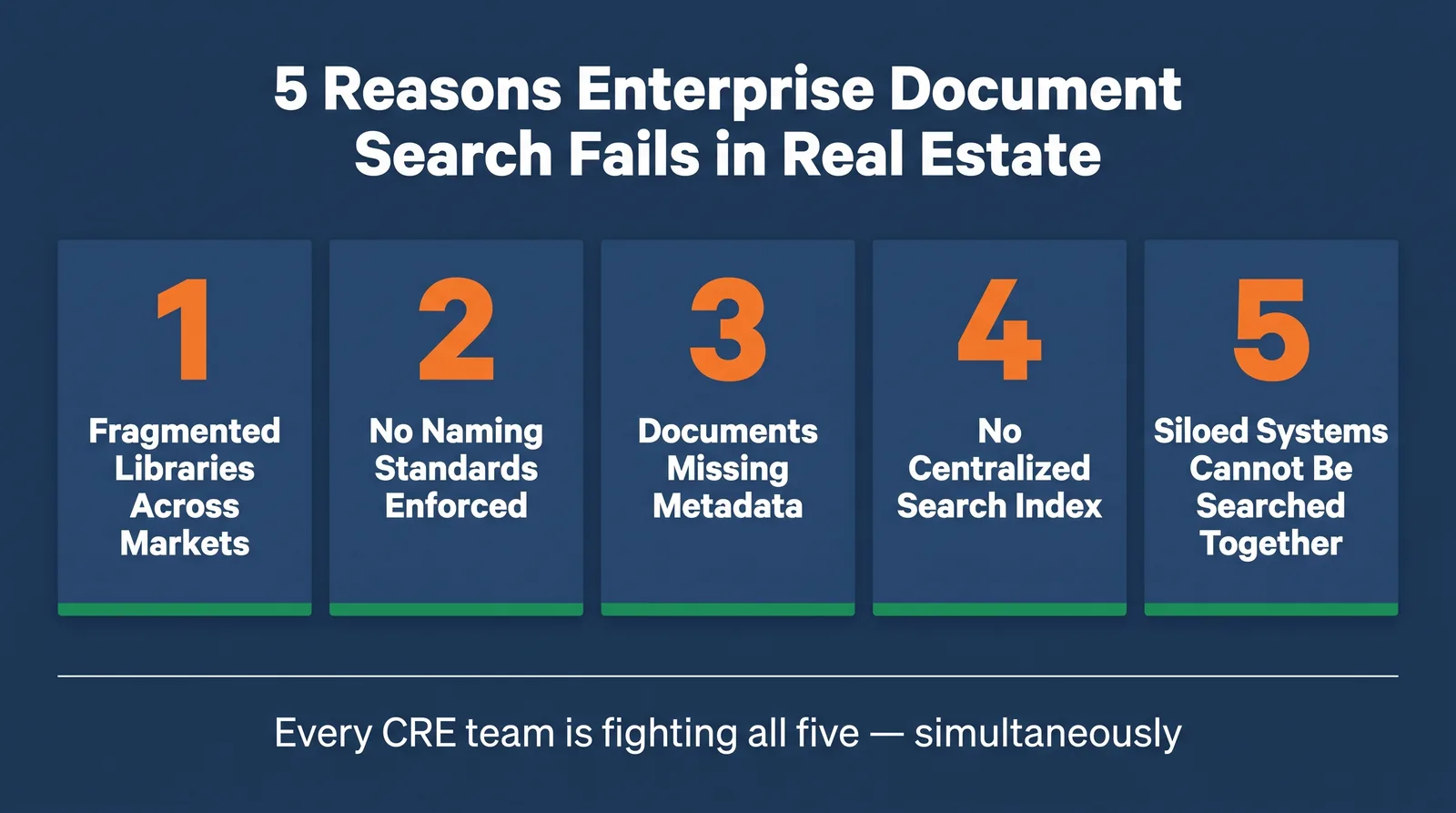
- The five root causes are fragmented libraries, no naming standards, missing metadata, no centralized index, and disconnected systems.
- SharePoint search can perform well, but only when metadata, permissions, and site architecture are deliberately governed.
- A SharePoint-native governance layer lets CRE teams achieve centralized enterprise retrieval without migration.
The 40-Minute File: A Problem Every CRE Team Knows
Search friction is often hidden by local workarounds. Teams memorize where certain documents usually live, then improvise when exceptions appear. That works until urgency rises during closings, audits, or lease-critical deadlines.
At portfolio scale, ad hoc retrieval habits fail because they depend on tribal knowledge, not system design.
Why Enterprise Document Search Fails Real Estate Teams
- Fragmented libraries across markets and business units.
- Inconsistent file naming and duplicate conventions.
- Optional metadata that is skipped at upload time.
- No unified index spanning all relevant SharePoint scopes.
- Siloed systems that cannot be queried together.
What Does Poor Document Findability Actually Cost?
Cost appears as labor loss, audit extension work, due-diligence delays, and avoidable compliance risk. In aggregate, retrieval inefficiency can consume large portions of team capacity that should be allocated to transactions and oversight.
| Team Size | Weekly Search Hours | Estimated Annual Cost |
|---|---|---|
| 25 | 80 | $300k+ |
| 50 | 160 | $600k+ |
| 100 | 320 | $1.2M+ |
What a Working Centralized Search Architecture Looks Like
- Unified index across markets, sites, and governed repositories.
- Mandatory metadata at upload for property, document type, market, date, and status.
- Full-text indexing including OCR for scanned legacy PDFs.
- Role-aware relevancy tuning for operations, leasing, and compliance users.
- Cross-system coverage for connected collaboration and transaction tools.
How ARC-Files Solves Enterprise Document Search for Commercial Real Estate
ARC-Files adds governance where CRE teams need it most: standardized provisioning, required metadata, centralized retrieval, and auditable access controls layered directly onto Microsoft 365.
See how ARC-Files delivers enterprise document search for CRE.
Frequently Asked Questions
Why is document search so difficult in commercial real estate?
CRE teams operate across fragmented multi-market repositories with inconsistent structure, which degrades precision and trust in search output.
Can SharePoint handle enterprise search for a large real estate portfolio?
Yes, with proper governance. Without enforced metadata and architecture standards, even capable search engines underperform.
What is the difference between document search and document management?
Document management governs storage and control. Search governs retrieval speed and accuracy. Effective CRE operations require both.
How long does it take to find a document without enterprise search?
In fragmented environments, single-file retrieval can regularly exceed 20 to 40 minutes, especially for historical or low-frequency files.
What is full text search in document management for real estate?
It means indexing document contents, not only names and tags, including OCR for scanned files so clauses and terms can be queried directly.
How can CRE teams improve findability without replacing SharePoint?
Enforce metadata, standardize provisioning, centralize index scope, and apply OCR plus governance overlays to existing Microsoft 365 content.
The Bottom Line
Enterprise search problems in CRE are architecture problems. When libraries are governed, metadata is required, and indexing is unified, retrieval becomes fast, predictable, and auditable.
Learn how ARC-Files solves enterprise search for commercial real estate teams.
Keep reading
Suggested Articles
Continue exploring document management, SharePoint governance, and compliance for commercial real estate teams.