Is Google Drive Enough for Commercial Real Estate? The Honest Answer
Google Drive is strong for collaboration, but enterprise CRE teams need governance features like retention automation, lease alerts, audit trails, and metadata enforcement to manage risk at scale.
Published July 30, 2026 · By ARC-Files · 14 min read
Published: July 30, 2026 | By ARC-Files
Here is the honest answer most vendors will not give you: Google Drive is a perfectly capable tool. It just was not built for what commercial real estate teams ask it to do.
That distinction matters. Google Drive is designed for collaboration. It makes it easy to share a file, co-edit a spreadsheet, and sync folders across devices. For a small residential team or a startup office, that is often enough.
For an enterprise CRE operation managing 50, 100, or 500 properties across multiple markets, the gap between what Google Drive does and what your team actually needs is not a small configuration problem. It is an architectural one.
This is not an argument for ripping out tools your team already uses. It is an argument for understanding exactly what you are trading away so you can make a real decision, not a default one.
Key Takeaways
- Google Drive and Dropbox are collaboration tools, not document management systems. For CRE teams, that distinction has real compliance consequences.
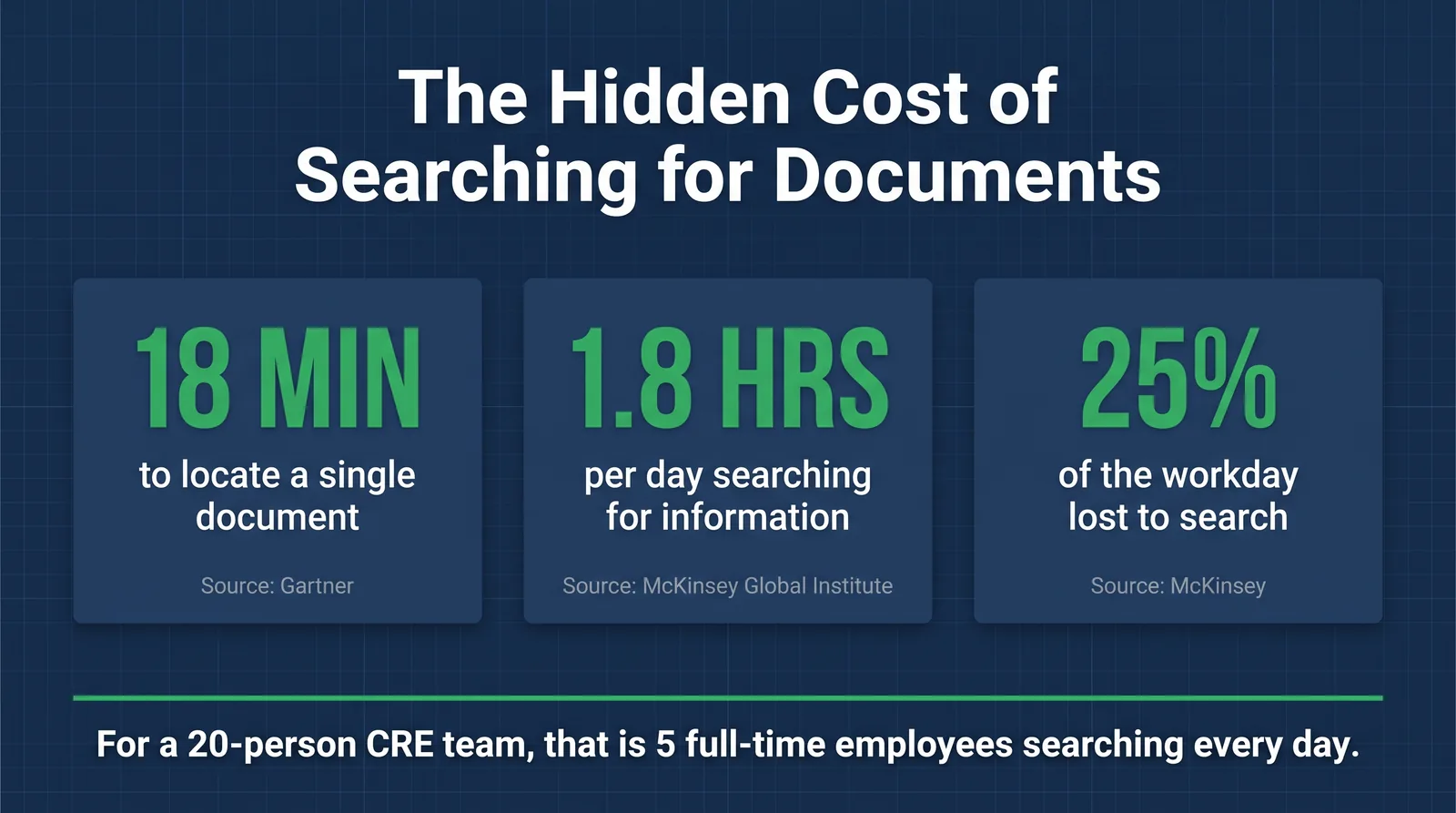
- Gartner reports professionals spend an average of 18 minutes locating each document. Across large portfolios, that cost compounds quickly.
- Generic cloud storage has no native mechanism for enforcing retention schedules, surfacing lease expiration dates, or producing auditor-ready trails automatically.
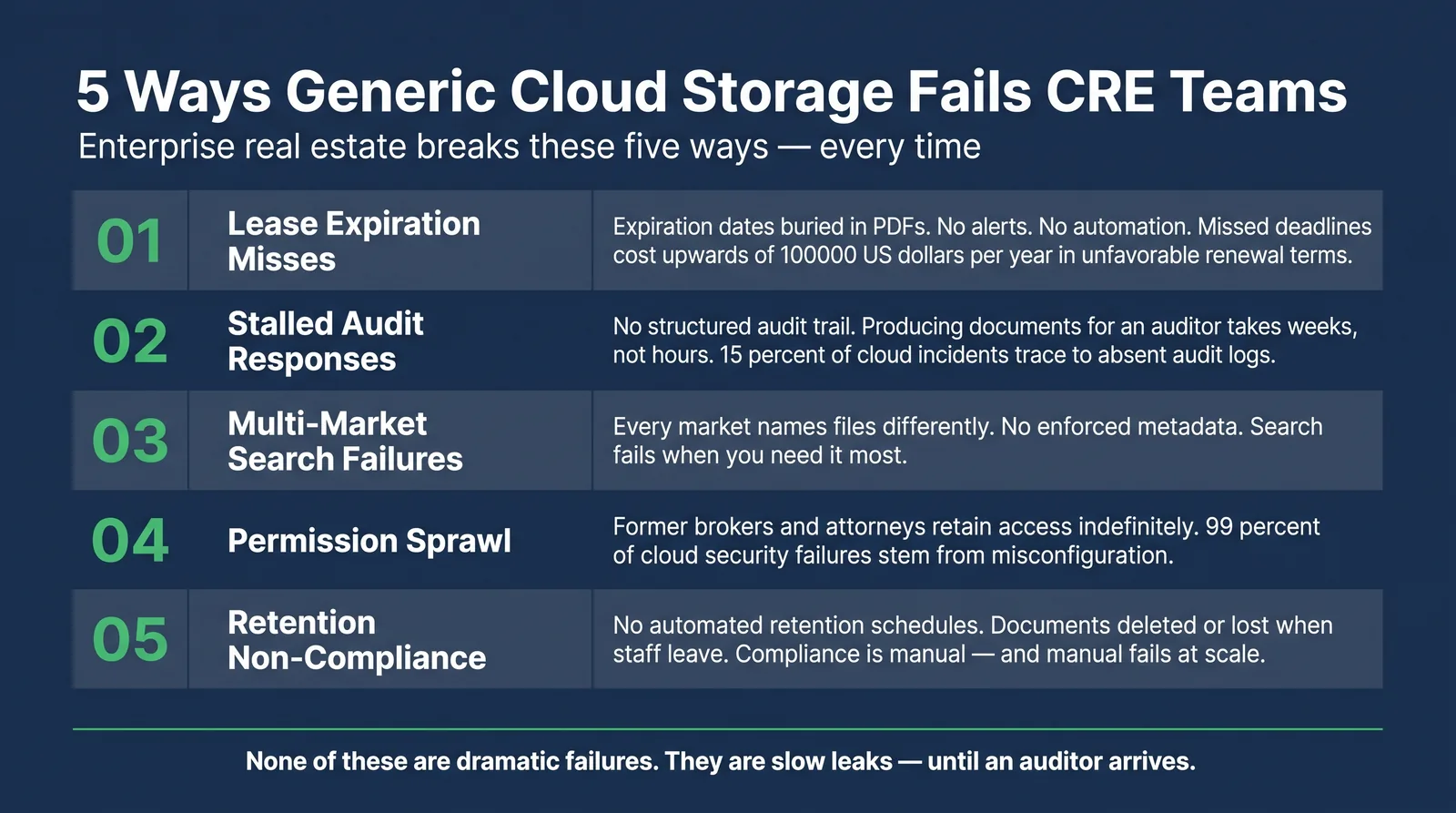
- Enterprise teams on Google Drive typically hit five repeat failure modes: lease misses, audit delays, search failures, permission sprawl, and retention non-compliance.
- A governance layer on top of Microsoft 365 can close these gaps without forcing migration to a new document platform.
Why CRE Teams Default to Google Drive
Most CRE teams do not choose Google Drive after a formal evaluation. They inherit it.
A leasing manager uploads files because everyone already has an account. A director adds market folders because that is the pattern. Asset management stores loan docs next to lease files because no one defined a standard. Over time, the folder tree gets deeper and team conventions drift.
Google Drive is genuinely excellent at collaboration. Sharing documents, co-editing, and integrating with Gmail and Calendar are real strengths. But CRE document management requires enforced structure, metadata-driven search, expiration alerts, role-based access, and audit trails that survive external scrutiny.
Those are governance problems. Google Drive is not a governance tool. Teams usually discover this only after something breaks.
What Google Drive Actually Is (and Is not)
Google Drive for commercial real estate documents is widely used, but its role is often misunderstood. Google Drive is a cloud file storage and collaboration platform. It stores files, shares them, and supports simultaneous editing with basic version history.
What it is not:
- A metadata-enforced library. Users are not required to tag property, expiration, or document type consistently.
- A retention automation engine. Native automated records management for CRE retention schedules is not included.
- A governance layer. New properties do not inherit a standardized provisioning template automatically.
This is not about criticizing Google Drive. It is about recognizing structural limits when collaborative storage is used as enterprise governance.
5 Scenarios Where Generic Cloud Storage Breaks Down for CRE
These are recurring failure modes for portfolios above 25 properties.
Scenario 1: The Lease Expiration Miss
Google Drive does not alert you when a lease is approaching expiration. The date is buried in a PDF, the PDF is buried in a folder, and reminders are usually tied to individual people rather than systems.
In governed CRE environments, expiration dates are pulled into structured fields and automated alerts are generated portfolio-wide.
Scenario 2: The Audit Document Request
Auditors may request amendments for multiple properties plus a full access history for a fixed period. With generic storage, teams manually assemble files and then piece together activity logs that are not structured for property-level compliance workflows.
Governed systems maintain document-level audit trails by default and can export them on demand.
Scenario 3: Multi-Market Search Failures
Teams in different markets use different naming patterns and vocabulary. Search quality collapses when metadata is missing and naming conventions drift.
Multi-market search works only when controlled taxonomy is enforced at provisioning.
Scenario 4: Permission Sprawl
Access accumulates through one-off sharing and link grants. Former brokers, attorneys, or contractors can retain access long after engagement ends.
Governance platforms use role-based assignments, review cycles, and audit-visible permission changes to control sprawl.
Scenario 5: Retention Non-Compliance
Retention policies in CRE are not optional. Without automated schedules, files are deleted manually, moved without traceability, or left unmanaged until audit time.
Governed systems enforce retention by document type and flag violations before they become formal findings.
The Feature Gap: Google Drive vs. Enterprise CRE Document Management
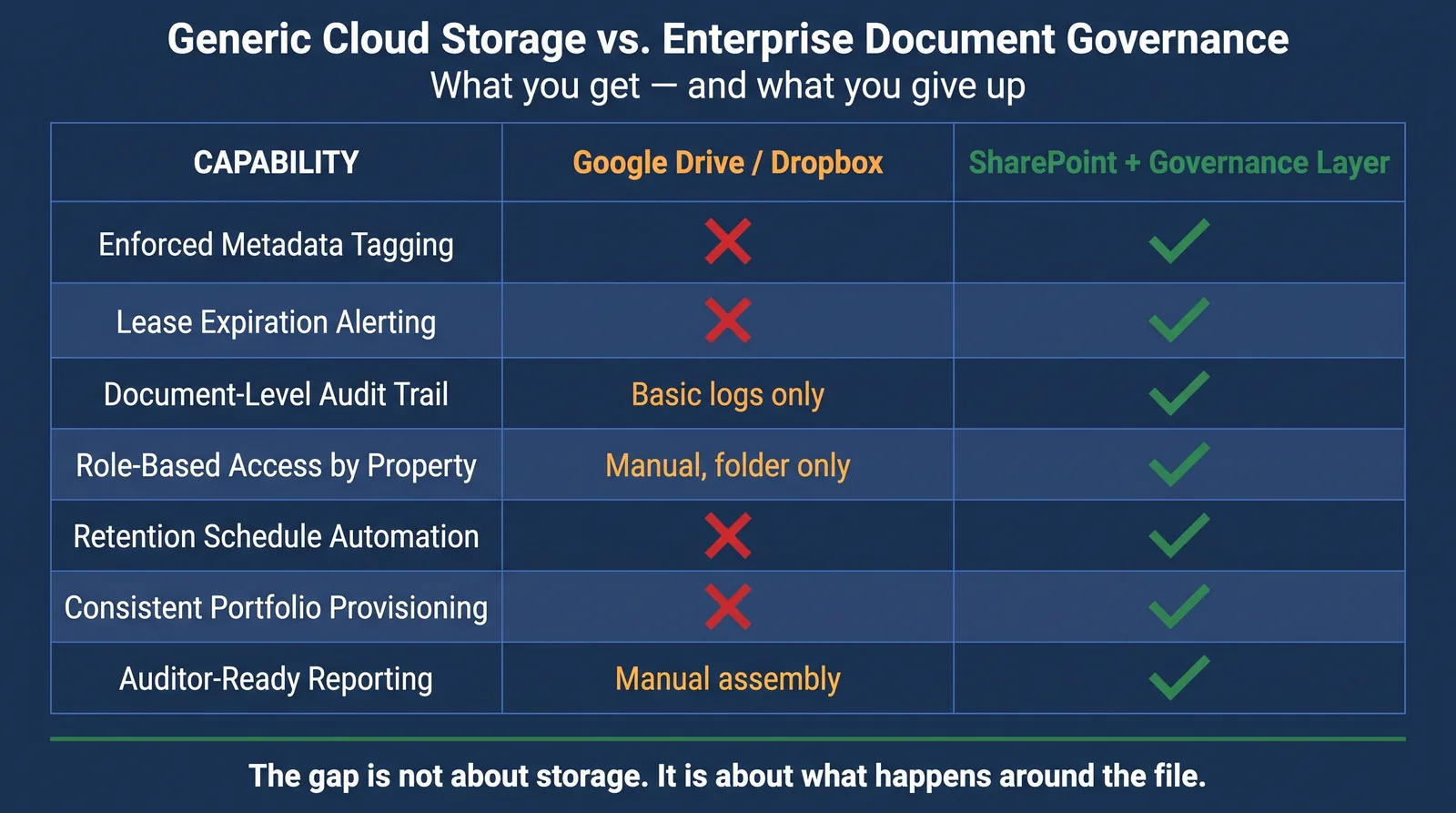
The core gap is not storage. It is governance around the file: tagging, access, retention, alerting, approval history, and consistency at scale.
| Capability | Google Drive | Dropbox | SharePoint + Governance Layer |
|---|---|---|---|
| Enforced metadata tagging | No | No | Yes |
| Lease expiration alerts | No | No | Yes |
| Document-level audit trail | Basic logs | Limited | Full |
| Role-based property access | Manual | Manual | Structured |
| Multi-market centralized search | Folder-dependent | Folder-dependent | Metadata-driven |
| Retention schedule automation | No | No | Yes |
| Provisioning for new properties | Manual | Manual | Templated |
| Auditor-ready reporting | Manual assembly | Manual assembly | Structured export |
| ASC 842 and IFRS 16 support | None native | None native | Workflow support |
| Permission review workflows | Manual | Manual | Automated reviews |
| Microsoft 365 integration | Limited | Third-party | Native |
The Objection We Hear Every Time
The most common response is: We have used Google Drive for years and have not had any problems.It sounds reasonable, but these risks are usually slow leaks rather than dramatic outages.
Missed renewal windows, long audit cycles, stale access rights, and absent retention reporting remain invisible until they become urgent. At portfolio scale, the cost of late discovery is far higher than the cost of structured governance.
What a Governance Layer Actually Looks Like
For many enterprise CRE teams already on Microsoft 365, the practical path is a SharePoint-native governance layer rather than migration into a proprietary system.
ARC-Files runs directly on existing SharePoint infrastructure. Files stay in place while governance controls are added around them.
- New properties are provisioned with consistent structure, metadata, and permissions.
- Lease dates are captured as structured data and trigger automated notifications.
- Audit trails are available at document, property, and portfolio levels.
- Retention schedules are enforced by document type.
- Search runs cross-market with metadata filters in seconds.
Ready to see what structured document governance looks like for a real CRE portfolio? Explore ARC-Files.
Frequently Asked Questions
Is Google Drive compliant for commercial real estate document management?
Google Drive can be used in compliant environments, but it lacks native lease alerting, automated retention enforcement, and audit structures aligned to CRE compliance workflows. Manual overlays can work for smaller teams and typically break at scale.
What is the difference between Google Drive and a document management system for real estate?
Google Drive is collaboration-first storage. A DMS adds governance controls: metadata enforcement, automated retention, role-based access, lease alerting, and structured audit trails. A DMS enforces consistency automatically across markets and properties.
Can you use Dropbox instead of a DMS for commercial real estate?
Dropbox can work for small teams with limited portfolio complexity. For enterprise CRE operations with 25 or more properties and compliance requirements, it shares the same governance limitations as Google Drive.
Does Google Drive have an audit trail for commercial real estate documents?
Google Workspace provides activity logs, but teams usually need manual assembly to produce property-specific, compliance-ready audit packages with version and approval context.
How does SharePoint compare to Google Drive for commercial real estate document management?
With governance in place, SharePoint supports managed metadata, retention labels, role-based security groups, and deeper Microsoft 365 compliance tooling. Without governance, it still requires manual discipline to remain consistent.
What should CRE teams look for when evaluating document management tools?
Look for centralized metadata search, retention automation, document-level audit trails, lease alerts, role-based access templates, tamper-resistant version history, repeatable multi-market provisioning, and Microsoft 365 integration.
The Bottom Line
Google Drive for commercial real estate is a common default. It is rarely a deliberate governance decision. At enterprise portfolio scale, the gap between collaboration storage and governed document management is operationally expensive.
The question is not whether Google Drive is useful. The question is whether your team can absorb the risk and manual overhead of a tool that was not built for CRE governance.
ARC-Files layers enterprise CRE document governance directly onto your existing Microsoft 365 environment. No migration, no new platform, no data transfer. See how it works at arcfiles.com.
Keep reading
Suggested Articles
Continue exploring document management, SharePoint governance, and compliance for commercial real estate teams.