Real Estate Management Software: The Document Governance Gap
How real estate software handles documents, where transaction-bound storage creates governance gaps, and three ways portfolios can close them.
Published August 22, 2026 · By ARC-Files · 17 min read
Published: August 22, 2026 | By ARC-Files
Real estate management software is built to run transactions, leases, accounting, maintenance, and property operations. Its document features vary widely: some platforms use record-bound attachments, while others offer dedicated document-management modules. The governance gap appears when records need independent metadata, retention, search, permissions, and audit treatment beyond the transaction that created them.
For a real estate technology leader, this distinction matters because replacing a property management system to solve a document problem can create a much larger project than necessary. The better first step is to identify where documents sit in the existing stack, what they are attached to, and whether their lifecycle can be governed independently.
Key Takeaways
- Property management systems are systems of record for operational data; that does not automatically make them systems of record for every underlying document.
- Document capabilities differ substantially by platform. Yardi, MRI Software, and RealPage now offer dedicated document-management functionality beyond basic attachments.
- The architectural problem appears when a document's identity, permissions, searchability, or lifecycle is dependent on the transaction record to which it is attached.
- Retention should follow the requirements of the record itself. Microsoft Purview, for example, supports retention periods triggered by events such as contract expiration rather than only file age.
- Most portfolios have three choices: replace the existing repository, extend the current PMS, or add a governance layer around documents where they already live.
What Real Estate Management Software Is Built to Do
Real estate management software is fundamentally designed around operational objects: property, building, unit or space, lease, tenant or resident, vendor, work order, invoice, deal, opportunity, maintenance event, and accounting transaction. The system maintains structured data around those objects and gives users workflows to operate the business.
Yardi Voyager, for example, describes its broader suite around leasing, financials, maintenance, dashboards, reporting, and portfolio operations. RealPage OneSite describes itself as an operating foundation for leasing, accounting, operations, and property workflows. Entrata similarly positions its operating system around leasing, accounting, maintenance, and resident operations.
A document has a different job.
The executed lease is evidence of the agreement represented by structured fields in a lease record. The certificate of insurance supports an insurance-compliance process. The invoice supports an accounting transaction. The environmental report may remain relevant long after a specific acquisition workflow has closed.
That difference produces two related but distinct concepts:
- A system of record is the authoritative source for a particular set of business data or processes.
- A document repository is the environment responsible for storing, finding, controlling, and governing the files that evidence those processes.
One product can do both. The question is whether it actually does both for the document types and governance obligations your organization has.
Related: Real Estate Document Management Software: The 2026 Enterprise Guide.
The Attachment Model: How Documents Are Actually Stored in a PMS
One of the simplest ways to add documents to an operational application is to associate a file with an existing record. The relationship looks roughly like this:
PROPERTY → LEASE → ATTACHMENT
PROPERTY → WORK ORDER → ATTACHMENT
DEAL → TASK → FILE
The model makes intuitive sense. A user looking at a lease can immediately see the documents related to the lease. Several current products publicly expose this architecture.
AppFolio's published API provides an Attachments object that can upload files to bills, charges, journal entries, occupancies, owners, properties, rental applications, units, violations, and work orders.
VTS exposes a Document Attachment API in which attachments are addressed through specific building, space, and lease IDs. At the lease level, supported attachment types include lease documents, lease abstracts, VTS summaries, and private documents.
Dealpath allows legal teams to attach documents to deal workflows and describes files and documents as information embedded in deal tasks. Dealpath also states that term sheets, underwriting models, and legal documents can be attached directly to deal records.
The attachment model is not inherently bad. In fact, it is excellent when the document's useful lifecycle is closely aligned with the operational record. The problem begins when those lifecycles separate.
The Document Can Outlive the Transaction
Consider an executed retail lease. During active operations, it logically belongs with the tenant and lease record. Years later, the lease terminates.
The operational team may archive or deactivate the lease because it is no longer part of current rent administration. The executed agreement may still need to be discoverable for a dispute, audit, property sale, tax question, historical CAM reconciliation, or approved retention requirement.
If document visibility is entirely dependent on navigating to the inactive lease record, the document still exists but operational discoverability has deteriorated. That is the attachment-model problem. It is not necessarily a storage failure. It is a lifecycle-coupling failure.
Dedicated Document Layers Change the Architecture
Current vendor offerings also show why it would be inaccurate to describe every real estate platform as nothing more than an attachment store.
Yardi explicitly distinguishes ordinary Voyager attachments from its Document Management for SharePoint product. Yardi states that Voyager attachments provide basic file storage, while its SharePoint integration adds metadata-driven search, OCR, version control, retention, sharing, workflows, and other Microsoft 365 capabilities. Documents reside in the customer's SharePoint Online environment and are synchronized with Voyager data and permissions.
MRI Software's Contract Intelligence is explicitly described as a central document repository with permissions, structured data, missing-document detection, retrieval, and lease-document analysis. RealPage also offers OneSite Document Management as a dedicated cloud-based document solution with portfolio-wide document workflows, eSignature, activity logging, recovery, and indexing.
The correct architectural question is therefore not "Does our PMS support files?" It is:
Are our documents merely attached to operational records, or do they have an independent governance layer?
Platform-by-Platform Document Capability
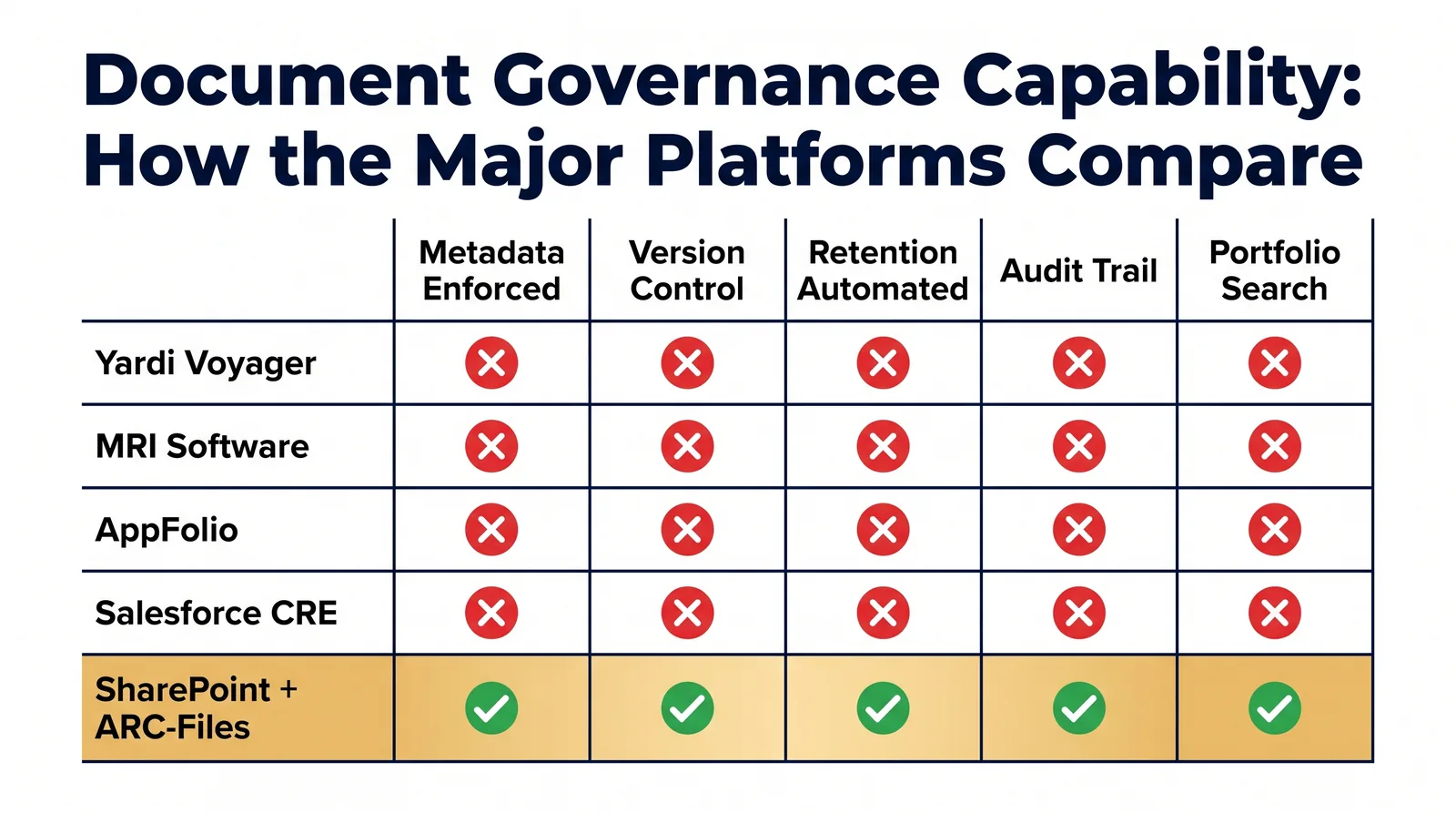
The table below uses only functionality that can be confirmed from current public vendor documentation. "Not publicly documented" means exactly that; it does not mean the platform lacks the capability.
| Platform | Documented storage model | Retention | Portfolio retrieval |
|---|---|---|---|
| Yardi Voyager | Attachments plus optional Document Management for SharePoint | Documented in SharePoint offering | Metadata-based search documented |
| MRI Software | Varies by product; Contract Intelligence documented as central repository | Not publicly documented | Centralized retrieval documented |
| RealPage OneSite | Dedicated OneSite Document Management | Not publicly documented | Portfolio-wide workflows documented |
| AppFolio | API exposes files as attachments to specific objects | Not publicly documented | Not publicly documented |
| Entrata | Lease and addendum upload, resident and property workflows | Not publicly documented | Operational access documented |
| VTS | API exposes attachments against lease IDs | Not publicly documented | Lease-bound retrieval documented |
| Dealpath | Files attached to deals and tasks; Box and Dropbox integrations | Not publicly documented | Centralized deal files documented |
The table is intentionally conservative. AppFolio, VTS, and Dealpath provide particularly clear examples of the record-bound model in their publicly accessible API or product documentation, while Yardi, MRI, and RealPage publicly document dedicated document products rather than merely a file-upload field.
The purpose of this comparison is not to declare one architecture superior. It is to expose a question that normal software selection often misses:
What happens to the document when the business object it is attached to changes state?
The Four Consequences of Treating Documents as Attachments
An attachment architecture starts causing governance problems when the document needs to behave differently from its parent record.
1. Search Becomes Dependent on Operational Context
Imagine legal needs every executed lease containing a specific counterparty across a portfolio. If the repository is designed primarily for users who already know the property and lease record, the search path becomes property → tenant → lease → attachment. That path works during normal property operations. It is weaker during portfolio-wide diligence because the person asking the question may not know which property contains the record.
A governed document model instead allows the document itself to carry searchable attributes such as property ID, legal entity, tenant, counterparty, document type, execution date, agreement ID, market, confidentiality class, and record status. The document can then be retrieved by its attributes without requiring the user to reconstruct the original transaction.
2. Permissions Can Inherit the Wrong Business Lifecycle
Operational permissions change. A property is reassigned. A regional manager changes. A deal team closes a transaction. A former tenant becomes irrelevant to daily operations. Those changes may legitimately affect access to the operational record while creating a different access requirement for the historical document.
Yardi's SharePoint product illustrates the tradeoff clearly: Yardi advertises synchronized security where Voyager permissions automatically apply to SharePoint documents. That synchronization is useful when operational and document permissions are supposed to match. For privileged legal material, historical transaction evidence, litigation records, or records held beyond the operational lifecycle, an organization may need an additional governance rule that is not derived solely from current property responsibility.
The issue is not inheritance itself. The issue is whether inherited access remains appropriate for the entire life of the record.
3. Retention Becomes Tied to the Wrong Clock
The creation date of an attachment is not necessarily the event that should determine how long the underlying business record is retained. A lease uploaded in 2026 might remain active for years. A retention rule approved by legal may not begin until the contract expires or another defined event occurs.
Microsoft Purview explicitly supports event-based retention, giving contract expiration as an example of an event that can start a retention period. ARMA guidance similarly emphasizes that retention periods should have documented legal, fiscal, administrative, historical, or business justification instead of arbitrary time periods.
That means a document repository needs enough independence to retain a document because of what the record is, not simply because of the status of the screen from which someone uploaded it.
4. The Transaction Can Close Before the Evidence Stops Mattering
A deal closes. A property is sold. A lease terminates. A work order is completed. The operational object has reached the end of its active workflow. The document may not have.
Dealpath, for example, explicitly supports historical information about completed or disposed deals, because transaction history remains valuable after the active pipeline has ended. A DMS should be evaluated on what happens after the originating workflow ends, because that is the moment when a file stops being an operational attachment and becomes historical evidence.
Where the Gap Shows Up: Audits, Diligence, Disposition, and Litigation Hold
Normal operations are often the easiest environment for document retrieval. Exceptions expose the architecture.
Audit
An auditor rarely asks whether you can open the lease screen. The request is more likely to involve a population: every executed agreement for a defined period, the supporting evidence for a set of transactions, all approvals around a control, documents proving a particular obligation, or the history of changes to a record. The relevant documents may span many properties, entities, transactions, and statuses.
Due Diligence
A sale or financing process converts document retrieval from an occasional operational task into a portfolio completeness test. The difference between "we probably have it" and "the repository shows this required document type as missing" becomes significant.
A transaction data room can gather copies, but gathering is not governance. If the diligence team exports a lease, amendment, estoppel, SNDA, title policy, and environmental report into a temporary folder, the organization still needs to know where the authoritative internal record remains.
Disposition
Disposition creates two different document questions. The first is transaction disposition: the asset is being sold. The second is records disposition: a record has reached the end of its approved retention period and can be destroyed. Those are not the same event. A sold property's records may still need to remain available according to the organization's approved schedule.
Microsoft Purview's records-management tooling includes disposition review and proof of disposition, allowing records teams to review content before permanent deletion and maintain evidence of disposal.
Litigation Hold
Litigation is another moment when operational state and record state separate. A terminated lease can be operationally inactive while the underlying documents must remain preserved. The architecture therefore needs a mechanism for records obligations to override ordinary operational cleanup.
A platform should not be evaluated merely on whether it can hold a PDF. It should be evaluated on whether the organization can change the governance state of that PDF without changing the business transaction that originally created it.
Three Ways to Close the Document Gap: Replace, Extend, or Layer
Once the gap is identified, there are three basic architectural responses.
1. Replace
Move documents into a dedicated enterprise content-management or document-management repository and make that environment authoritative. Replace when the current repository is obsolete, security requirements cannot be met, documents are fragmented across unsupported systems, the organization needs substantially broader ECM capabilities, or current systems cannot expose documents through workable integrations.
Replacement gives the cleanest architectural break. It also creates the largest change surface: documents have to be classified, migrated, validated, permissioned, reconciled, and eventually removed or frozen in the old environment. It is appropriate when the existing foundation is genuinely wrong, and excessive when documents already sit in a capable Microsoft 365 environment and the actual problem is inconsistent governance.
2. Extend
Use document-management functionality offered by the existing real estate platform. Yardi's Document Management for SharePoint is a direct example, connecting Voyager data, metadata, and permissions to a SharePoint document environment. RealPage OneSite Document Management is another example of extending within an existing vendor ecosystem, and MRI provides several document-oriented capabilities inside its broader portfolio.
Extend when your PMS vendor already solves the actual document requirement, integration with operational data is more valuable than vendor independence, the available metadata, retention, permissions, and search satisfy governance requirements, or adding another vendor would duplicate functionality. Extending the PMS should always be evaluated before buying another system.
3. Layer
Keep the operational system as the system of record for property and transaction data while governing documents in a dedicated layer. The architecture becomes PMS and lease or property data, connected through integration or synchronized metadata, to a governed document repository.
A layer can be a SharePoint-based architecture, a dedicated DMS, an ECM platform, or another repository depending on requirements. The advantage is separation of responsibilities: the PMS does not need to become a records-management platform, and the document repository does not need to become a property-accounting system. Each does what it is built to do.
Why Layering Usually Wins for Larger Portfolios
There is no universal research-backed rule that 15 properties is the exact threshold where a separate document layer becomes necessary. Portfolio complexity depends on asset type, markets, document volume, staffing, entities, regulatory exposure, and existing systems. Treat roughly 15 properties as a practical architecture checkpoint, not a benchmark.
The reason the layering model becomes more attractive as a portfolio grows is that four forms of variation compound.
- Property variation: different properties create different lease structures, vendors, construction histories, insurance files, and operational documentation.
- Market variation: different offices begin creating their own folder names, document types, and local processes. A "Lease Amendment" in one market becomes "Lease Modification" in another, and cross-portfolio search degrades even though every local team believes its own structure works.
- Permission variation: one property has a dedicated asset manager, another is handled by a regional team, and a third involves a joint venture. Local exceptions accumulate until the document-security model is no longer consistent.
- System variation: acquisitions introduce new repositories. One portfolio arrives with SharePoint, another brings Box, and a third has files embedded inside a legacy property system.
At that point, replacing the core PMS simply to standardize documents is usually disproportionate. A governance layer allows the organization to separate the question of what system runs a property from how a class of record should be governed.
When Your PMS Is Genuinely Enough
A dedicated document-management layer is not automatically better. For many organizations, the PMS is the correct home for documents. Your existing real estate management software may be enough when:
- the portfolio is operationally simple;
- users can consistently find documents;
- documents naturally follow the same lifecycle as their parent transactions;
- there are few cross-property retrieval requirements;
- retention obligations are limited or handled elsewhere;
- legal hold is uncommon or managed through another approved process;
- the vendor's document module already provides the required metadata and search;
- introducing another repository would create duplicate sources of truth.
A Yardi Voyager customer should evaluate Yardi Document Management for SharePoint before assuming a separate DMS is required. A RealPage OneSite customer should similarly evaluate OneSite Document Management. MRI customers have multiple document and lease-management products available inside the MRI ecosystem and should establish whether those products meet the requirement before adding another vendor.
If the existing system passes your governance tests, adding another platform can make the architecture worse. The objective is not to own more software. The objective is to know:
- where the authoritative document lives;
- how it is classified;
- how users retrieve it;
- who can access it;
- what happens when the operational record closes;
- what retention rule governs it;
- how it is preserved when normal disposition must stop.
If the PMS can answer those questions reliably, keep it.
Frequently Asked Questions
Does Yardi have document management?
Yes. Yardi Voyager supports attachments, and Yardi also offers Document Management for SharePoint, an add-on that connects Voyager to Microsoft SharePoint Online. Yardi documents capabilities including automated metadata tagging, synchronized security, search, OCR, versioning, sharing, workflows, and retention-related functionality. Documents remain in the customer's SharePoint environment.
Can MRI Software store lease documents?
Yes. MRI Software has multiple products that store or work with lease documents. MRI Contract Intelligence is described as a centralized document repository with structured data and document retrieval, while MRI ProLease supports detailed lease information and documents. MRI also provides lease abstraction and source-document linkage through Contract Intelligence.
What is the difference between a system of record and a document repository?
A system of record is the authoritative source for a defined set of operational data, such as properties, leases, tenants, transactions, or accounting entries. A document repository stores and governs the files that support those processes. One product can perform both roles, but the distinction matters when a document must remain searchable, retained, or restricted after its original transaction changes state.
Should I replace my property management software to fix document management?
Usually not as the first step. Determine whether the problem is the PMS itself or the way documents are governed. If the property system performs its operational job well, evaluate its existing document module, extend it through an integrated repository, or add a governance layer. Replace the PMS only when the underlying operating platform is also failing requirements.
Where ARC-Files Fits
ARC-Files, the SharePoint-native document management platform from Al-Rafay Global, is designed for organizations whose property and operational systems remain valuable but whose documents need a consistent governance layer inside Microsoft 365.
ARC-Files does not require the property management platform to become the document repository. Its architecture deploys SPFx modules inside the customer's Microsoft 365 tenant and is built around centralized search, metadata governance, retention and compliance workflows, and repeatable multi-market structures without requiring documents to migrate into a separate third-party cloud.
That approach is relevant when the document problem is between systems, rather than inside one transactional workflow.
It is not the right architecture for every portfolio. Organizations without a Microsoft 365 estate, companies already satisfied with their PMS vendor's document-management product, and businesses requiring full-scale ECM capabilities should evaluate those alternatives first.
See our real estate document-management approach or how the SharePoint-native architecture works.
Sources Cited
- Yardi — Document Management for SharePoint. Vendor documentation on Voyager attachments, SharePoint storage, synchronized metadata and security, enterprise search, OCR, versioning, workflows, and retention capabilities.
- MRI Software — Contract Intelligence and ProLease. Vendor documentation on centralized document storage, lease-document management, structured document data, and source-linked abstraction.
- RealPage — OneSite Document Management. Vendor documentation on a cloud-based portfolio document-management product with indexing, eSignature, activity logging, recovery, and integrated property workflows.
- AppFolio Stack API — Attachments. Public API documentation confirming files can be attached to operational objects including properties, occupancies, bills, units, rental applications, violations, and work orders.
- Entrata — product and commercial documentation. Public materials on lease-document upload and execution, custom documents, lease abstracts, clauses, and insurance documentation.
- VTS — Document Attachment API. Public API documentation confirming lease-level attachments and explicit document types associated with lease IDs.
- Dealpath — product documentation. Public documentation on documents attached to deals and tasks, Box and Dropbox integration, and historical deal information.
- Microsoft Learn — Records Management and event-based retention. Documentation on retention labels, file plans, record declaration, disposition review, proof of disposition, and retention periods triggered by events such as contract expiration.
- ARMA — retention schedule guidance. Guidance explaining that retention periods should have a documented basis and that modern electronic records systems can use metadata and event-based triggers.
Last updated: August 22, 2026
Keep reading
Suggested Articles
Continue exploring document management, SharePoint governance, and compliance for commercial real estate teams.