Best Document Management Software for Real Estate in 2026: 7 Criteria That Actually Matter
Compare real estate DMS options using seven criteria that expose migration risk, governance, auditability, data residency, scale, and exit cost.
Published September 27, 2026 · By ARC-Files · 26 min read
Published: September 27, 2026 | By ARC-Files
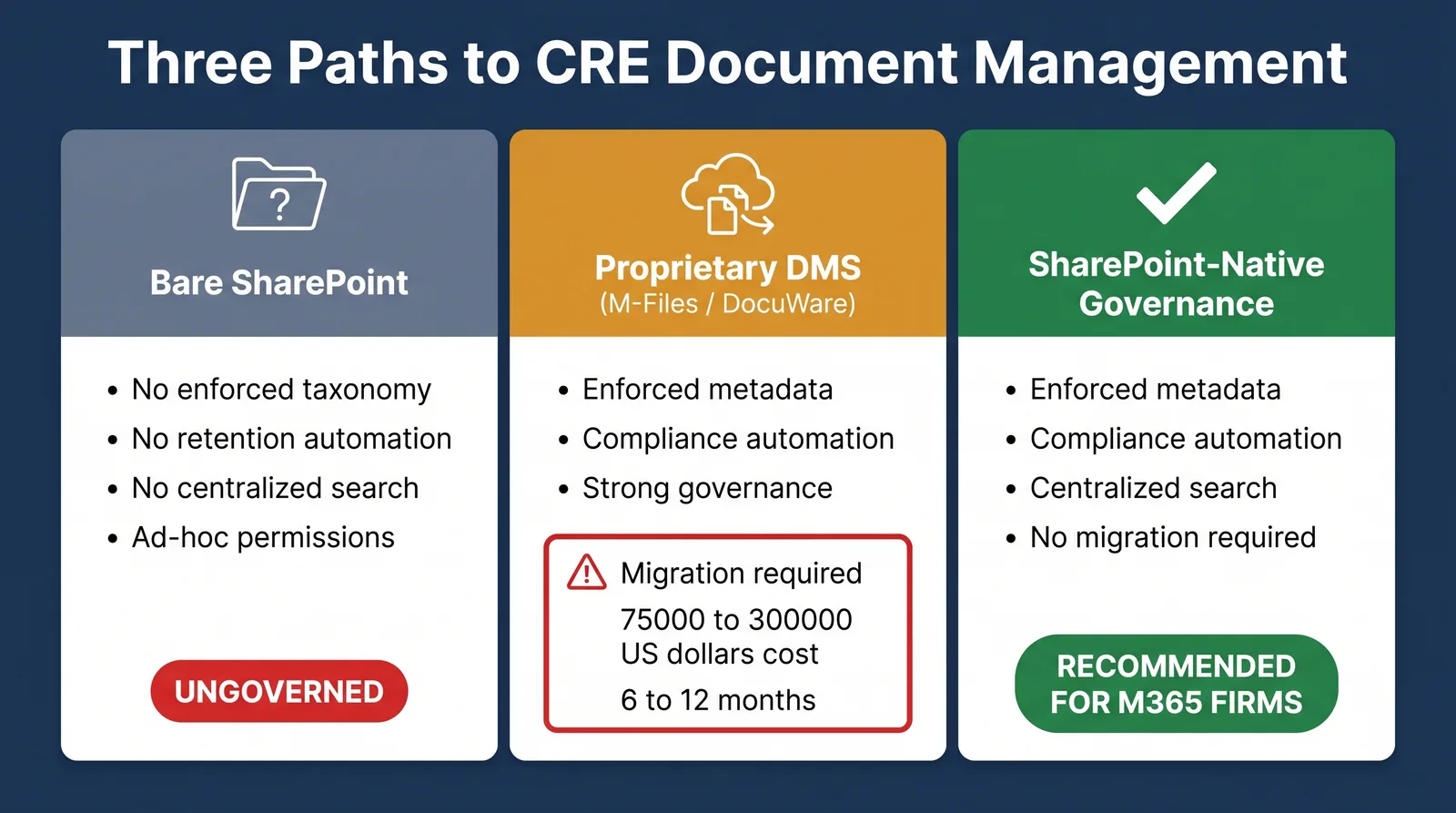
The best document management software for real estate depends less on feature count than on architecture. Buyers should compare where documents reside, what must migrate, how metadata and retention are enforced, whether audit evidence is exportable, how easily new markets are provisioned, and what it will cost to leave the platform later.
That produces a different shortlist from the usual comparison of OCR, search, e-signatures, mobile apps, and AI checkboxes.
A commercial real estate organization already operating hundreds of SharePoint libraries has a different problem from a company replacing shared drives, a legal department managing privileged matters, or an accounting operation ingesting thousands of invoices.
This guide provides a scoring method rather than a winner.
Key Takeaways
- Start with architecture, not feature count.
- Data residency and migration risk should be evaluated before user-interface preferences.
- Metadata enforcement matters more than whether a platform merely allows metadata.
- Retention must survive moves between folders, libraries, properties, and operational states.
- Ask vendors to show the raw audit-trail export, not just an attractive activity screen.
- Multi-market provisioning can turn a reasonable first deployment into an expensive operating model.
- Exit cost belongs in the purchase decision before the contract is signed.
Why Feature Checklists Produce Bad Shortlists
Most document-management comparisons look something like a table with checkmarks for search, versioning, permissions, OCR, workflow, and AI across three vendors.
The table looks objective. It tells you almost nothing.
M-Files, DocuWare, Laserfiche, Box, Egnyte, SharePoint, NetDocuments, and other mature platforms all provide substantial document-management capabilities. Their architectural differences become much more important than whether a marketing page contains the word "workflow."
For example, M-Files is built around metadata-driven content and can connect information across multiple repositories rather than requiring everything to be organized through a traditional location hierarchy. Its current platform includes automated retention, permissions, version tracking, auditability, workflow, and Microsoft 365 integration.
DocuWare combines document repositories, indexing, workflow automation, audit reports, version management, and intelligent document processing. Its audit reports can be exported as CSV and can include document events such as storage, display, index changes, printing, and annotations.
Laserfiche combines document management with process automation, records lifecycle management, audit logging, AI classification/extraction, integrations, and optional WORM storage.
Box offers content management, collaboration, integrations, workflows, security, and advanced governance features, while higher tiers also add broader content intelligence and data-residency capabilities.
All of those systems can check many of the same feature boxes. They do not create the same implementation.
The Seven Criteria That Actually Matter
The weighting below is a recommended starting point for a real estate organization. Change the weights before issuing an RFP if your risk profile differs.
| Criterion | Suggested weight |
|---|---|
| 1. Data residency and repository architecture | 20% |
| 2. Migration blast radius and rollback path | 15% |
| 3. Metadata enforcement at point of capture | 15% |
| 4. Retention independence from folder/location | 15% |
| 5. Audit-trail quality and exportability | 15% |
| 6. Multi-market provisioning cost | 10% |
| 7. Exit cost | 10% |
| Total | 100% |
Score each platform from 1 to 5: 1 = poor fit, 2 = meaningful limitation, 3 = workable, 4 = strong, 5 = unusually strong for the requirement.
Multiply each score by the criterion weight. Do not compare total scores until every stakeholder agrees with the weights.
1. Where Does Your Data Physically Reside After Implementation?
This should be the first architecture question. Not "Is the platform secure?" but "After implementation, where does our authoritative document actually live?"
Possible answers include existing Microsoft 365 tenant, vendor-operated SaaS repository, customer-hosted infrastructure, multiple connected repositories, regional cloud zone, or hybrid architecture. These are not equivalent.
Microsoft 365 / SharePoint
Microsoft publishes specific SharePoint and OneDrive data-residency commitments and supports Advanced Data Residency and Multi-Geo for eligible customers. Microsoft also allows administrators to identify committed data location through the Microsoft 365 admin center.
For an organization already committed to Microsoft 365, that may be important because the DMS project does not necessarily introduce another primary document cloud.
Box
Box Zones currently supports regional storage across ten regions for eligible Enterprise Plus and Enterprise Advanced customers. Box's terms also make an important distinction: content can be stored in the selected location while some metadata storage and processing may still occur in the United States.
That is precisely the type of detail a buyer should investigate rather than reducing residency to a yes/no checkbox.
M-Files
M-Files supports cloud, self-hosted, and Microsoft-centered deployment models. Its current Microsoft 365 offering states that content can be stored directly inside the customer's Microsoft 365 environment while M-Files provides the metadata, governance, and workflow layer.
The Buyer Question
Ask every vendor: Draw the architecture and show exactly where the authoritative binary file, metadata, audit history, extracted AI data, search index, backups, and temporary processing data reside.
A single word such as "Azure" or "US-hosted" is not an architecture answer.
2. What Is the Migration Blast Radius, and Can You Roll Back?
Migration is one of the least honestly priced parts of document management.
Suppose a real estate company has 13 markets, 120 SharePoint sites, 800,000 documents, thousands of broken permission scopes, old property folders, active lease workflows, legal records, tax records, and links embedded in Teams, Outlook, spreadsheets, and internal applications.
A vendor says: We'll migrate everything. That statement should increase scrutiny, not reduce it.
The Migration Blast Radius Includes
- document binaries;
- metadata;
- folder structures;
- permissions;
- version history;
- sharing links;
- integrations;
- workflow references;
- retention labels;
- legal holds;
- embedded URLs;
- user bookmarks;
- downstream automation.
The more objects that change, the larger the rollback problem.
Ask for a Rollback Path
A migration plan should answer: Can the original repository stay authoritative during pilot? How are delta changes synchronized during cutover? What happens if validation fails? Can migrated users revert without losing work? What happens to old links? What gets left behind?
A vendor that requires a full repository move can still be the correct choice. But the migration risk belongs in the evaluation score.
M-Files explicitly supports connections to existing repositories and states that organizations do not necessarily have to migrate information immediately.
A SharePoint-native layer has a different migration profile when the files are already in SharePoint because the governing layer can be applied where the documents currently reside. That can be an advantage. It can also be irrelevant if the current repository itself is the problem.
3. Can the Platform Enforce Metadata at the Point of Capture?
Many systems support metadata. That is not the same as enforcing it.
Suppose an employee uploads Lease_FINAL2.pdf. Can the platform require the user or workflow to establish Property, Legal Entity, Tenant, Document Type, Parent Agreement, Execution Date, and Status before the record becomes part of the governed repository?
If not, the organization is relying on cleanup later. Cleanup later is expensive.
What Good Enforcement Looks Like
A strong solution can define document classes, make appropriate fields mandatory, restrict values through controlled taxonomies, inherit attributes where appropriate, extract or suggest metadata, reject incomplete records or route them for review, and bulk-remediate legacy content.
M-Files makes metadata central to its architecture and can use automated tagging and metadata-driven workflows. DocuWare uses index fields to assign structured information such as client name, date, invoice number, and other attributes during processing. Microsoft SharePoint supports required columns, content types, managed metadata, and automation, but enforcement quality depends on how the environment is configured rather than appearing automatically when a library is created.
Real Estate Test
During the demo, upload an amendment with an intentionally poor filename. Ask: Without changing the filename, make this discoverable as an amendment for Property X, Tenant Y, Agreement Z, executed on Date A. Then attempt to save it while leaving one required field blank. Watch what happens.
4. Does Retention Survive Folder and Library Moves?
Retention must follow the business record. It should not depend on whether an employee remembered the correct folder.
Imagine an executed lease is assigned a retention rule. Six years later, somebody moves it from Property/Tenant/Leases to Property/Archive. Does the retention control survive? What if it moves to another library? What if the property is sold? What if the lease becomes inactive? What if litigation begins?
Those are more useful questions than "Does the platform support retention?"
M-Files publicly documents automated retention and destruction policies driven by information context rather than ordinary folder location. Laserfiche's Business and Business+ plans currently include Records Lifecycle Management, while its records-management capabilities include automated retention schedules, legal holds, and disposition workflows. Egnyte provides content lifecycle policies on specified higher plans, including retention, deletion, and archival policies. Microsoft Purview can apply retention labels and records-management controls to SharePoint content, but licensing and configuration need to be verified for the actual Microsoft environment.
Demo Test
Ask: Apply a retention rule to this lease, move it into another location, change its operational status, and show me whether the retention state changes. Do not accept screenshots. Have the vendor demonstrate it.
5. Can the Audit Trail Survive an Actual Audit?
"Audit trail included" is one of the least useful phrases on a feature sheet. You need to know what the system records and how evidence leaves the system.
Ask whether the audit trail captures user, timestamp, activity, previous metadata value, new metadata value, document access, download, version event, deletion attempt, workflow action, permission event, and retention change. Then ask: Export it.
DocuWare provides downloadable CSV audit reports across document, file cabinet, organization, and system levels. Its document events can include storage, index changes, display, print, and annotations.
M-Files documents version and access-history tracking and extended audit logging at higher platform levels. Laserfiche lists Advanced Audit Trail in its Business and Business+ tiers and describes it as an immutable record of user and system activity. NetDocuments is particularly strong where legal document security is the center of the use case: its current platform documentation emphasizes role-based access, ethical walls, security controls, versioning, and audit trails for legal teams.
What "Audit-Ready" Should Mean
At minimum, the question "Who changed this document classification?" should not be answered with "Somewhere in Activity." It should be answered with:
2026-08-17 14:31
User: JSmith
Action: Metadata update
Field: Document Type
Previous: General
New: Lease Amendment
That is evidence.
6. What Does It Cost to Provision the Next Market?
Most DMS demos show one perfect environment. Real estate organizations need to ask about Market 14.
Imagine the initial deployment covers Chicago, Dallas, and Phoenix. Six months later, the company acquires a portfolio in Atlanta. How does Atlanta get provisioned? The question sounds minor. It can determine the operating cost of the platform.
Measure the Provisioning Process
Ask the vendor to show: create new market, create standard libraries/repositories, publish document classes, apply metadata, establish permissions, apply retention, configure search, connect relevant systems, train market admins, and validate configuration. Then ask: How many professional-services hours does that require?
The Hidden Issue: Configuration Drift
If every new market is manually constructed, the organization eventually gets a Chicago taxonomy, a Dallas taxonomy, a Phoenix taxonomy, and an Atlanta taxonomy v2. Now cross-market search is compromised.
Repeatable provisioning deserves its own score because scale is not simply "Can the system technically contain more properties?" Scale means "Can the 20th market receive the same governance model as the first without a mini implementation project?"
7. What Does It Cost to Leave?
Buyers routinely model implementation cost and ignore exit cost. That is backwards.
Every system will eventually be replaced, consolidated, acquired, re-platformed, or radically upgraded. The question is how painful that moment becomes.
Exit Cost Includes More Than Exporting PDFs
Ask: Can files be exported in bulk? Does metadata come with them? In what format? Does version history export? Does audit history export? Can retention state export? Are original timestamps preserved? Are document relationships preserved? Are workflows exportable? Are APIs available after termination? How long is post-termination access available? What proprietary structure must be reconstructed elsewhere?
A product that makes entry easy and exit expensive has a higher lifetime switching cost.
Repository Ownership Changes Exit Cost Dramatically
If files already live in the customer's SharePoint tenant, removing a governance layer may leave the underlying binaries and SharePoint libraries in place. If documents are stored in a separate vendor repository, leaving generally requires moving them somewhere else.
Neither architecture is inherently wrong. The buyer should simply price the difference.
Copyable DMS Scoring Worksheet
Replace the sample weights if your requirements differ.
| Criterion | Weight | Vendor score (1–5) | Weighted score | Evidence / demo note |
|---|---|---|---|---|
| Data residency / repository architecture | 20 | ___ | ___ | ___ |
| Migration blast radius / rollback | 15 | ___ | ___ | ___ |
| Metadata enforcement | 15 | ___ | ___ | ___ |
| Retention independence | 15 | ___ | ___ | ___ |
| Audit evidence / exportability | 15 | ___ | ___ | ___ |
| Multi-market provisioning | 10 | ___ | ___ | ___ |
| Exit cost | 10 | ___ | ___ | ___ |
| Total | 100 | ___ / 500 |
Weighted-Score Formula
score × weight
Example: Data-residency score = 4, Weight = 20, Weighted points = 80. Maximum total = 500.
Do not assign scores based on sales responses alone. For every score above 3, record the demonstrated evidence that justified it.
How the Main Document-Management Categories Score
These scores are editorial starting points, not universal vendor grades. Actual scores change according to deployment model, licensing tier, geography, integrations, and the customer's current repository.
| Category | Data residency | Migration risk | Metadata enforcement | Retention | Audit evidence | Multi-market scale | Exit cost |
|---|---|---|---|---|---|---|---|
| SharePoint + Microsoft Purview | 5 | 4* | 4 | 5 | 4 | 4 | 5 |
| SharePoint-native governance layer | 5 | 5* | 5 | 4–5 | 4 | 5 | 5 |
| Metadata-first DMS such as M-Files | 4 | 4 | 5 | 5 | 5 | 4 | 3 |
| Workflow-centric DMS/ECM such as DocuWare or Laserfiche | 3–4 | 2–3 | 5 | 5 | 5 | 4 | 2–3 |
| Cloud content platforms such as Box or Egnyte | 4 | 2–3 | 3–4 | 4 | 4 | 4 | 3 |
| Legal DMS such as NetDocuments | 3–4 | 2–3 | 5 for legal matters | 4–5 | 5 | 4 for legal organizations | 2–3 |
* Assumes documents already reside in Microsoft 365. A new SharePoint migration should receive a lower migration score.
The table does not say SharePoint is the best category. It shows why architecture changes the result.
A company already standardized on Microsoft 365 receives a very different migration score from one currently running Box, OpenText, or network storage.
Named Platform Snapshots
SharePoint + Microsoft Purview
Strong when: the organization already operates Microsoft 365 and wants configurable document libraries, metadata, permissions, collaboration, retention, search, and records controls.
Microsoft currently lists SharePoint Plan 1 at $5 per user/month paid yearly, although broader Microsoft 365 licensing, Purview capabilities, data-residency options, automation, and implementation can materially change total cost.
Weak when: the organization expects Microsoft to provide a real-estate information architecture automatically. SharePoint is infrastructure. Someone still has to design the taxonomy, content types, retention model, permissions, provisioning, and administration.
M-Files
Strong when: metadata-driven organization, workflow, governance, Microsoft integration, or cross-repository context is central.
M-Files' current Essentials package is publicly listed at $65 per seat/month, while Enterprise pricing is customized according to scale, compliance, AI usage, and other needs.
M-Files is especially relevant where the question is "How do we organize information by what it is instead of where someone saved it?" Its public materials emphasize metadata, automated retention, workflow, external repositories, permissions, and auditability.
Weak when: the organization simply needs modest improvements to an already well-governed SharePoint estate and does not need another document-management platform.
DocuWare
Strong when: document processing, workflow, indexing, auditability, and structured repository management are important.
DocuWare currently states that DocuWare Cloud commonly ranges from approximately $30 to $125+ per user/month, depending on user type, plan, storage, and implementation. Specialized capabilities such as IDP can add cost.
Its audit capabilities are unusually concrete in public documentation, including CSV export and document-level event history.
Weak when: the primary goal is avoiding a new repository because documents are already properly located in Microsoft 365.
Laserfiche
Strong when: document management is tightly connected to business-process automation, records governance, audit evidence, integrations, AI extraction, or formal workflow.
As of September 2026, Laserfiche publicly lists Professional at $73/user/month billed annually and Business at $93/user/month, with different minimum-user requirements and included capabilities.
Weak when: the organization's problem is narrow SharePoint governance and the broader automation/records platform would be unused.
Box
Strong when: external collaboration, cloud content management, integrations, security, workflow, and global content access are major requirements.
Box currently lists annual-plan pricing including Business at $15/user/month, Business Plus at $25/user/month, Enterprise at $35/user/month, and Enterprise Plus at $50/user/month, with different feature sets and limits. Box Zones adds regional residency choices for eligible higher-tier customers.
Weak when: the company's objective is specifically to keep authoritative real-estate documents inside an existing SharePoint estate rather than introduce another primary content platform.
Egnyte
Strong when: secure cloud collaboration, governance, lifecycle controls, AEC-related workflows, integrations, and cross-repository security are important.
Current public annual-plan pricing lists Business at $22/user/month, Enterprise Lite at $39/user/month, Elite at $48/user/month, and Ultimate as a custom quote, with lifecycle management beginning at specified higher tiers.
Weak when: the organization is not looking for another content platform and wants all document-management capability to remain within Microsoft 365.
NetDocuments
Strong when: the dominant workload is legal. NetDocuments is explicitly designed around law firms and in-house legal departments, with strong document/email management, versioning, legal workflows, security, ethical walls, governance, and audit capabilities.
That can make it an excellent answer for a real estate company's legal department. It does not automatically make it the right portfolio-wide operational DMS for property managers, asset managers, facilities teams, and lease administrators.
Current public commercial pricing was not located, so pricing should be treated as not publicly disclosed and obtained directly from NetDocuments.
ARC-Files
ARC-Files is included because this article is published by its vendor.
Current public pricing is custom rather than per-seat. ARC-Files states that pricing is scoped to the size and complexity of the existing SharePoint environment and that all 20 modules are included.
Its strongest scores come from architecture: it deploys into the existing SharePoint Online tenant, no separate file migration is required, documents remain in Microsoft 365, metadata mapping is included, and its stated scope includes search, bulk tagging, retention, audit visibility, permissions visibility, and provisioning-related modules.
Its weak points matter just as much: it presupposes a Microsoft 365 / SharePoint environment, it is not a high-volume invoice-capture or OCR-centric ECM platform, it is not intended to replace formal enterprise case-management software, it is not the correct answer when the business needs broad repository federation across many non-Microsoft systems, and its public pricing requires a scoped quote rather than allowing a buyer to calculate total cost from a simple published seat price.
That should lower or eliminate ARC-Files from the shortlist for several legitimate use cases.
The Two Criteria Buyers Discover Too Late
Two issues deserve disproportionate attention because they usually become visible after implementation.
Exit Cost
A platform can appear cheap in Year 1 and expensive in Year 5 if leaving requires proprietary export work, metadata reconstruction, custom API development, workflow rebuilding, link replacement, version-history loss, audit-history extraction, or retention migration.
Make vendors explain the exit path before purchase.
Per-Market Provisioning
A platform may also appear inexpensive when demonstrated for one property. Then the organization asks for Houston, Miami, Los Angeles, Toronto, and London. If every rollout requires consultants to manually configure document classes, permissions, retention, repository structures, integrations, and workflows, the operating model becomes consulting-dependent.
A real estate DMS should therefore be evaluated against cost to launch Market 1 and separately cost to launch Market 20. The second number often matters more.
Who Each Category Is Genuinely Wrong For
SharePoint alone is wrong when
The organization lacks internal Microsoft 365 governance expertise and expects an empty SharePoint site to become a controlled DMS by itself.
A SharePoint-native layer is wrong when
The company does not use Microsoft 365 as a strategic content platform or needs sophisticated high-volume capture, formal case management, or broad non-Microsoft federation.
M-Files is wrong when
The metadata-first model and added DMS platform complexity solve problems the organization does not actually have.
DocuWare is wrong when
The organization's document volume and process automation requirements are modest enough that the added repository and workflow architecture would provide little value. DocuWare itself states that very low document-processing volumes can be a sign that a lighter solution is more appropriate.
Laserfiche is wrong when
The buyer will not use the workflow, records, audit, integration, and automation capabilities that justify the platform.
Box is wrong when
The principal requirement is not collaboration or enterprise content management but governing an existing SharePoint estate without creating another primary repository.
Egnyte is wrong when
The buyer does not need another secure cloud-content and governance platform and already has the required controls inside its existing environment.
NetDocuments is wrong when
The dominant use case is property operations rather than legal matter management. A great legal DMS can still be the wrong operating model for 40 property-management teams.
Frequently Asked Questions
What is the best document management software for real estate?
There is no single best platform for every real estate firm. The correct choice depends on where documents currently reside, whether migration is acceptable, how metadata and retention are enforced, the quality of audit evidence, multi-market rollout requirements, and exit cost. Compare architecture before comparing feature counts.
How do I compare DMS vendors?
Use a weighted scorecard with evidence. Evaluate data residency, migration risk, metadata enforcement, retention behavior, audit exports, multi-market provisioning, and exit cost. Require vendors to demonstrate each high-scoring capability using your own scenarios rather than awarding points based on a feature sheet.
What should I ask a DMS vendor in a demo?
Ask the vendor to upload a poorly named document and enforce metadata, move a retained record between locations, export the raw audit trail, provision a new market, explain exactly where your document and metadata reside, show how versions export, and demonstrate what happens when you terminate the platform.
How much does document management software cost?
Pricing varies substantially. Current public examples include SharePoint Plan 1 at $5/user/month, Box business plans starting around $15/user/month on annual billing, Egnyte Business at $22/user/month, M-Files Essentials at $65/seat/month, and Laserfiche Professional at $73/user/month. DocuWare states typical cloud pricing of roughly $30–$125+ per user/month depending on configuration. Some platforms, including ARC-Files and NetDocuments, require a quote for the relevant deployment. Subscription price is only one component of total cost; include migration, configuration, integrations, professional services, training, support, administration, additional modules, and eventual exit.
Where ARC-Files Fits
ARC-Files, the SharePoint-native document management platform from Al-Rafay Global, belongs on a shortlist when the organization already uses Microsoft 365 and the goal is to impose real-estate-specific search, metadata governance, retention controls, audit visibility, and repeatable portfolio structures without moving documents into another repository.
It should not be shortlisted simply because this article is published by ARC-Files.
If the organization needs high-volume intelligent capture, sophisticated enterprise workflows, broad cross-repository federation, legal matter management, or a content platform independent of Microsoft 365, another category can be a better architectural match.
Compare DocuWare, M-Files, and SharePoint before building the final shortlist, and use pricing only after the architecture itself has passed the evaluation.
Sources Cited
- Microsoft — SharePoint pricing and data residency. SharePoint Plan 1 pricing, document-library functionality, Product Terms residency, Advanced Data Residency, and Multi-Geo.
- M-Files — platform, security/compliance, integrations and pricing. Metadata-driven DMS, retention, auditability, workflow, Microsoft integration, deployment options, and current platform pricing.
- DocuWare — pricing, audit reports and document processing. Current pricing guidance, metadata/indexing, workflow, version integrity, and CSV-exportable audit records.
- Laserfiche — pricing. Current Professional, Business, and Business+ packaging including workflow, AI, audit, records management, security, and integrations.
- Box — pricing and Box Zones. Current business-tier pricing and regional data-residency controls.
- Egnyte — pricing and lifecycle controls. Current business-tier pricing and content-lifecycle capabilities.
- NetDocuments — document management for legal teams. Current legal DMS positioning, security, governance, versions, workflows, and legal-centric information architecture.
- ARC-Files — public pricing. Environment-scoped pricing, 20 included modules, SharePoint-native deployment, and no required file migration.
Last updated: September 27, 2026
Keep reading
Suggested Articles
Continue exploring document management, SharePoint governance, and compliance for commercial real estate teams.